AVAYA DOCUMENTATION CENTER
Find answers to your technical questions and learn how to use our products
Deploying and Upgrading Avaya G450 Branch Gateway
Connecting DC Power Source
About this task
For a G450 Branch Gateway with a DC power supply, use a -48 V nominal (-43 V min, -57 V max) DC power source capable of supplying 13.6 A / 585 watts per G450 DC power supply.
Procedure
- Connect the DC power cord to the DC power source as follows:
- Use the DC power cord specified in this document.
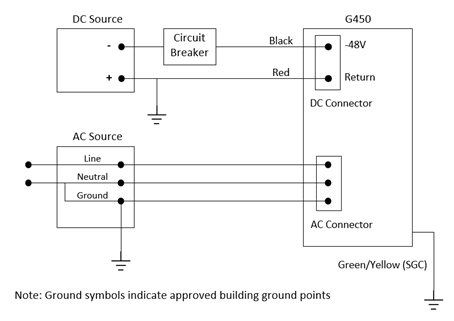
- Verify that the positive terminal of the DC source is connected to an approved building ground. If not, stop installation until a DC source with positive output grounding is available.
- Connect the red conductor to the positive terminal (return).
- Connect the black conductor to a circuit breaker. See Circuit breaker specifications.
- Make sure the circuit breaker is open (turned off).
- Connect the other end of the circuit breaker to the negative terminal of the DC source (-48 V).
- Connect the DC power cord to the G450 Branch Gateway as follows:
- Connect the DC connector of the power cord to the G450 Branch Gateway DC power supply input.
- Verify all connections are correct and close the circuit breaker to power up the G450 Branch Gateway.
Example