Configuring a Standard server for a cluster

Last Updated : Dec 04, 2024 |

About this task

Using EM, perform the following procedure to configure Avaya Aura® MS as a Standard server in the N+1 Load Sharing cluster.

Add Standard nodes after you add Primary and Secondary nodes to the cluster.

Before you begin

  • Ensure to replace the default staging certificates. See Replacing Default Staging certificates for the procedure.

  • Configure a separate Avaya Aura® MS as a Primary server and with a Replication Account enabled.

  • Configure a separate Avaya Aura® MS as a Secondary server and with a Replication Account enabled.

  • Obtain the UUID and the IP address of the Primary server.

  • Obtain the user name and password of the Replication Account of the Primary server.

Procedure

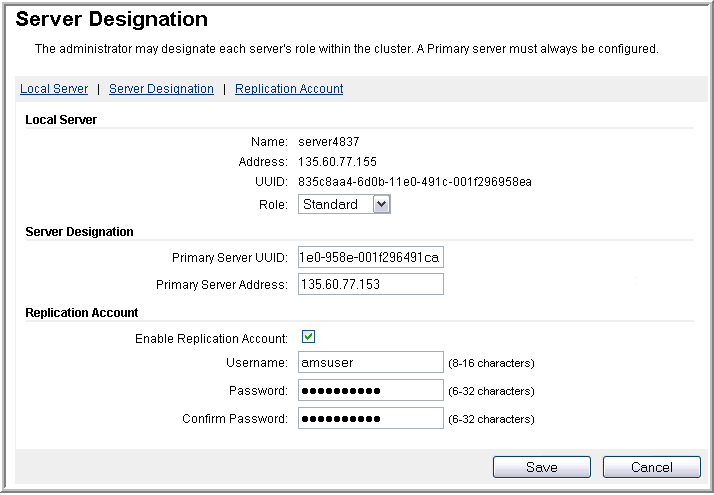
  1. To designate a server as Standard, navigate to EM > Cluster Configuration > Server Designation.


  2. In the Local Server section, set the Role to Standard.

    The system updates the page with fields that are specific to the Standard server configuration.

  3. Using the EM for the Primary server, copy the UUID of the Primary server.

    For more information about copying the UUID, see Obtaining the UUID of a media server.

  4. Using the EM for the Standard server, paste the UUID of the Primary server in the Primary Server UUID field.
    1. In the Primary Server Address field, enter the IP address of the Primary server.

    2. In the Replication Account section, ensure Enable Replication Account is selected.

    3. In the Username, Password, and Confirm Password fields, enter the user credentials you entered for Replication Account on the Primary server.

      Important:

      All servers in the cluster must use the same Replication Account user name and password.

  5. Click Save.
  6. Click Confirm.
  7. Restart Avaya Aura® MS for the changes to take effect. Navigate to: EM > System Status > Element Status and click Restart.
  8. Click Confirm.
  9. Repeat this procedure for each additional Standard server that you need to add to the cluster.

Next Steps

If you add a media server to a cluster enrolled in System Manager, then you must also enroll the new media server cluster node in System Manager.