AVAYA DOCUMENTATION CENTER
Find answers to your technical questions and learn how to use our products
Implementing and Administering Avaya Aura® Media Server
Monitoring protocol connections
About this task
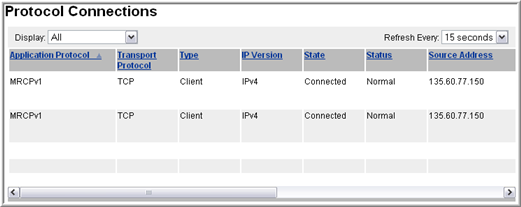
Perform the following procedure to view operational information about installed protocols:
Procedure
- To set the protocol connection data refresh interval, use the Refresh every drop-down menu.
View the information for the installed protocols using the vertical and horizontal scroll bars. You can change the order of the connection list by clicking the title of any column.
There are no actions that can be performed. The display is informational only.