

AVAYA DOCUMENTATION CENTER
Find answers to your technical questions and learn how to use our products
Using IP Office System Status
Active Calls
The Active Calls screen provides a summary of all the calls in the system. From the navigation panel, click Active Calls:
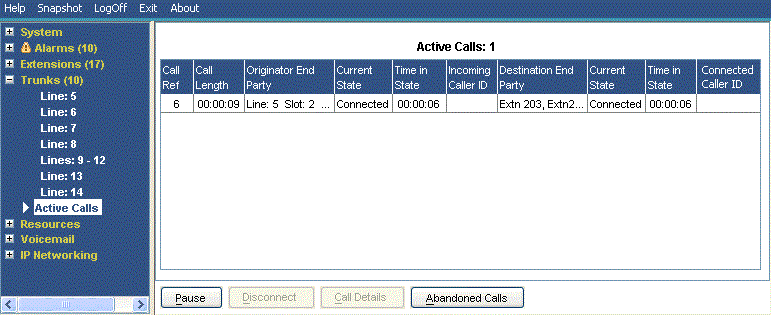
Information Displayed |
Description |
|---|---|
Call Ref |
Call reference for incoming trunks, assigned by the system and associated with the line in use. |
Call Length |
Total length of the call. |
Originator End Party |
Trunk or 'Currently At' information. See Call Details.
|
Destination End Party |
Trunk or 'Currently At' information. See Call Details.
|
Buttons
The following buttons can appear on this screen:
Button |
Description |
|---|---|
Call Details |
Displays call details for the selected call, trunk or trunk channel. |
Resume |
Resumes updating screen in real time. When pressed, the button label and function changes to Pause. |
Pause |
Stops the screen from updating. The button label and function changes to Resume when the screen is paused. |
Call Details |
Displays call details for the selected call, trunk or trunk channel. |
Abandoned Calls |
The Active Calls screen splits to display a list of incoming calls on a trunk where the caller disconnected before the call was first answered. |