

AVAYA DOCUMENTATION CENTER
Find answers to your technical questions and learn how to use our products
Using IP Office System Status
Status (Digital Trunk)
Path:
Access this menu by clicking Trunks on the navigation panel. Alternatively, click System and then Control Unit and double-click the line.
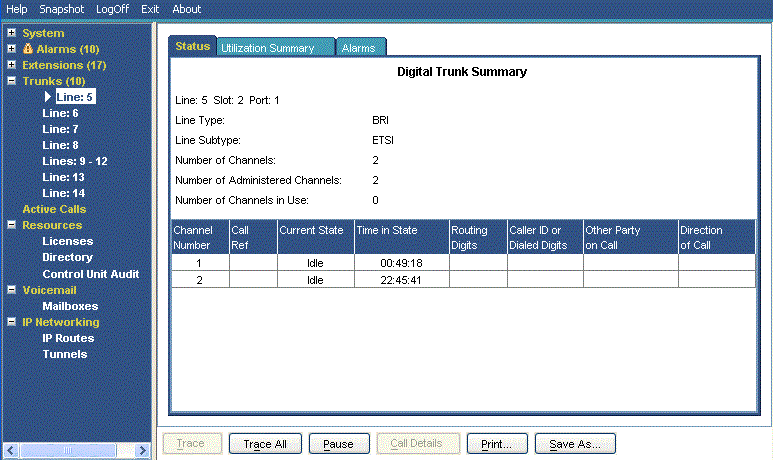
Information Displayed
Name |
Description |
|---|---|
Line/Slot/Port |
The line, slot and port number. |
Line Type |
See Line Protocols. |
Line Subtype |
See Line Protocols. |
Number of Channels |
The number of channels the trunk supports. |
Number of Administered Channels |
The number of channels configured as in service. |
Number of Channels in Use |
The number of channels currently in use. |
Channels Table |
See the Channels table below. |
Other Party on Call |
See the Other Party on Call table below. |
Direction of Call |
Displays the call as either Incoming or Outgoing. |
Channels Table
This table displays the following details:
Element |
Description |
|---|---|
Channel Number |
Click on the row to view details of the call. |
Call Ref |
Call reference, assigned by the system and associated with the line in use. When a trace is in progress, any calls on the trunk will show (i) next to the Call Ref. If you select Call Details while a trace is in progress, the screen remains unchanged and a pop-up window appears which contains details about the selected call. The pop-up shows the state of the call at the time of selection and does not update. See Trace. |
Current State |
The current state of the call associated with the button. See Call States (Trunk). |
Time in State |
Reset to zero each time there is a state change. |
Routing Digits |
The directed inward dialed digits that are sent by the central office. |
Caller ID or Dialed Digits |
The information displayed depends on the call direction.
|
Other Party on Call
Contains one of the following:
Where Call was Originated/Answered |
Displayed Value |
|---|---|
User |
User name and number |
VoiceMail Call flow |
Start Point name |
VoiceMail Box |
Voicemail - user name or hunt group name of the mailbox |
Data Service |
RAS - service name |
Conference |
Conference name |
Trunk |
Line ID/URI Group/Channel number |
Park Slot |
Park Slot - when the other end has parked the call |
Announcement |
Announcement - the hunt group associated with the announcement number |
Hunt Group |
Hunt Group - name and number when a call is in a hunt group queue (not alerting) |
Buttons
The following buttons can appear on this screen:
Button |
Description |
|---|---|
Call Details |
Displays call details for the selected call, trunk or trunk channel. |
Resume |
Resumes updating screen in real time. When pressed, the button label and function changes to Pause. |
Pause |
Stops the screen from updating. The button label and function changes to Resume when the screen is paused. |
Print... |
Prints all information available in the current screen (including any information currently scrolled off). |
Trace |
Starts a trace of the rows selected. System Status displays a trace for each call associated with the selected trunk or extension. See Trace. |
Trace All |
Starts a trace for the whole trunk group or extension. System Status displays a trace for all calls associated with the trunk or extension. See Trace. |
Save As... |
Saves the information shown on the screen to a text file (TXT or CSV). You can only save trace screens as CSV text files. |