

AVAYA DOCUMENTATION CENTER
Find answers to your technical questions and learn how to use our products
Using IP Office System Status
Directory
Path:
This screen shows information about the directory entries held by the system including imported directory entries.
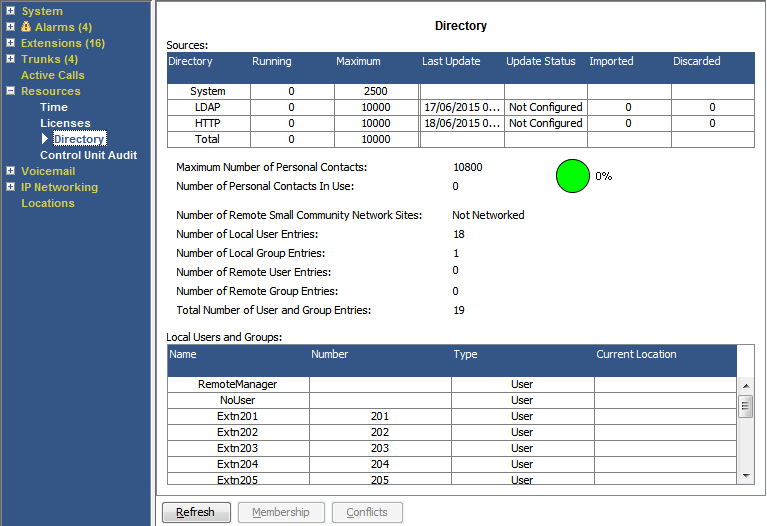
Information Displayed
Information |
Description |
|---|---|
Sources |
This part of the table indicates the directory sources the system is using.
|
Running |
The number of directory entries. |
Maximum |
The maximum capacity of such directory records that the system will allow. Note that System source entries have priority over imported LDAP/HTTP entries. |
Last Update |
The last time the Update Status was changed. Shown for LDAP and HTTP sources only. |
Update Status |
The status or result of the last update. Shown for LDAP and HTTP sources only.
|
Imported |
The number of entries imported during the last successful update. Shown for LDAP and HTTP sources only. |
Discard |
The number of entries discarded, due to being invalid or duplicate, during the last successful update. The system discards records if they have a blank name or number, they match an existing record or then exceed the total capacity of the system. Shown for LDAP and HTTP sources only. |
Buttons
The following buttons can appear on this screen:
Button |
Description |
|---|---|
Refresh |
Updates the screen. This button appears on screens that do not update automatically. |
Membership |
Display the users who are members of the selected hunt group. |
Conflicts |
Displays any conflicts with directory entries on other systems if in a multi-site network. |