

AVAYA DOCUMENTATION CENTER
Find answers to your technical questions and learn how to use our products
Using IP Office System Status
Abandoned Calls
Clicking the Abandoned Calls button whilst viewing the Active Calls screen, splits the screen to include a list of abandoned calls below the list of active calls. The abandoned calls table lists incoming calls where the caller disconnected before any answer.
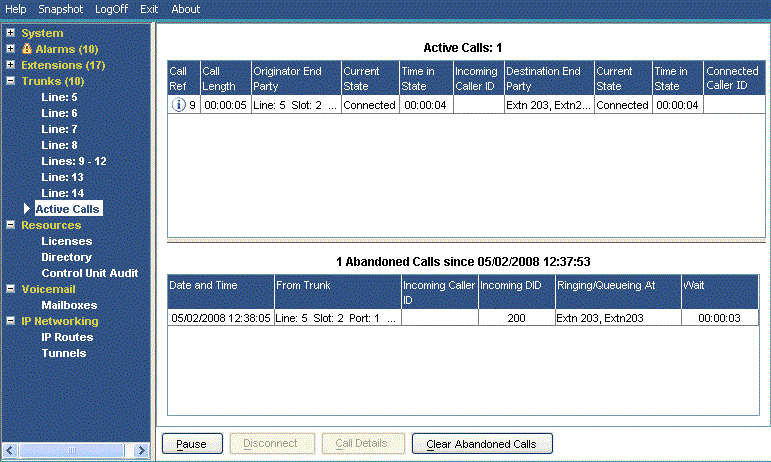
Information Displayed
The following information appears for abandoned calls that occur after clicking the Abandoned Calls button.
Field |
Description |
|---|---|
Date and Time |
Date and time the call started. |
From Trunk |
The line/channel information about the calling party. |
Incoming Caller ID |
The name and/or number as shown in the Active Calls list. |
Incoming DID |
The number as displayed in the Call Details screen. See Call Details. |
Ringing/Queuing At |
The alerting parties (if any) on the call at the time of disconnection. Otherwise (if the call was in a queue), the hunt group name. |
Wait |
The call duration until disconnection occurred. |
Buttons
The following buttons can appear on this screen:
Button |
Description |
|---|---|
Call Details |
Displays call details for the selected call, trunk or trunk channel. |
Resume |
Resumes updating screen in real time. When pressed, the button label and function changes to Pause. |
Pause |
Stops the screen from updating. The button label and function changes to Resume when the screen is paused. |
Clear Abandoned Calls |
Clears the list of all abandoned calls. This updates the date and time and enables the logging of further abandoned calls. |
Disconnect |
Clears the current call. The button cannot stop alerting calls on Loop Start, T1 Loop Start and T1 Ground Start lines. |