

AVAYA DOCUMENTATION CENTER
Find answers to your technical questions and learn how to use our products
Using IP Office System Status
Line Testing
Path:
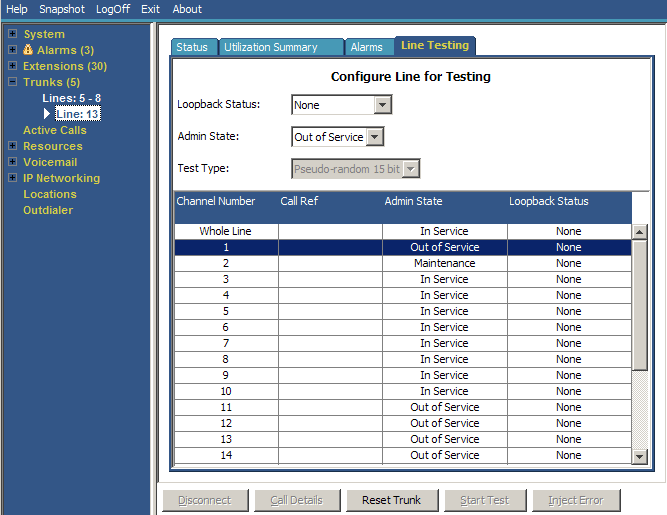
You can use this screen to perform loop back testing on a digital trunk.
Information Displayed |
Description |
|---|---|
Loopback Status |
You can use this drop-down to show and set the type of loopback applied to the currently selected channel or channels. The options are None, Payload, Line and Line (Anti Jitter). |
Admin State |
You can use this drop-down to show and set the Admin State of the currently selected channel or channels.
|
Test Type |
You can use this drop-down to select the type of loopback testing used. The options are Pseudo-random 15 bit or Pseudo-random 20-bit. |
The table lists the individual channels provided by the trunk. Selecting a particular channel allows you to change the change the settings of the channel and perform loopback testing on that channel. The Whole Line row allows you to perform the same action on all the channels at the same time.
Information |
Description |
|---|---|
Channel Number |
The individual channel number. |
Call Ref |
The call reference of the current call on the channel. |
Admin State |
The admin status of the individual channel. See above. |
Loopback Status |
The loopback status of the individual channel. See above. |
Buttons
The following buttons can appear on this screen:
Button |
Description |
|---|---|
Call Details |
Displays call details for the selected call, trunk or trunk channel. |
Disconnect |
Clears the current call. The button cannot stop alerting calls on Loop Start, T1 Loop Start and T1 Ground Start lines. |
Inject Error |
Insert an error into the digital trunk during a loopback test. |
Reset Trunk |
Reset the selected digital trunk. |
Start Test |
Start loopback testing on the trunk. You can only start testing when the Whole Line is set to Out of Service. When testing starts, the test results appear below the list of channels. During the test, the button label and function changes to Stop Test. |
Stop Test |
Stop loopback testing on the selected trunk. The button label and function changes to Start Test. |