

AVAYA DOCUMENTATION CENTER
Find answers to your technical questions and learn how to use our products
Using IP Office System Status
Resources
Path:
This screen provides a summary of key resources and their current usage in the system.
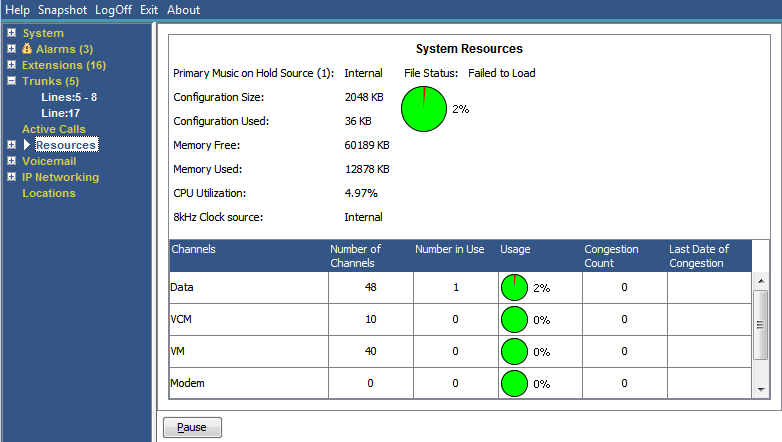
Information Displayed
Information |
Description |
|---|---|
Music on Hold Source |
The system provides music on hold using either an internally stored file or an externally connected audio input. |
Configuration Size |
The maximum possible size for the system configuration. This varies depending on the type of control unit. |
Configuration Used |
The current configuration size. |
Memory Free |
The number of free Kbytes. |
8kHz Clock Source |
Indicates which digital trunk the system is configured to use as the trunk clock source. |
Channels Table |
This table lists details of various resource channels. See the Channels table below. |
Number of Channels |
The total number of resources available in the system. |
Number in Use |
The number of resources that are currently in use. |
Usage |
The percentage of the resource currently being used. |
Congestion Count |
The total number of times that requests for a resource exceeded the available resource . |
Last Date of Congestion |
The last occasion when insufficient resources were available. |
Channels
This table lists details of various resource channels.
Channel |
Description |
|---|---|
VCM Channels |
The system uses voice compression channels for calls between IP and non-IP devices (trunks and or extensions). |
Data Channels |
The system uses data channels for Remote Access (RAS), Internet Access, and voicemail sessions. A data channel is an internal signaling resource used whenever a call goes between the IP network and an exchange line. For example, four people surfing the Internet will use a single data channel since they all share the same line to the ISP. Two people remotely accessing the Office LAN from home will use two data channels since they have dialed in on separate lines. IP extensions do not use data channels. |
Modem Channels |
This is the internal IP400 modem card. The 'private' modem in a Small Office Edition base unit or an ATM4 card is not included in these channels. |
Conference Channels |
The number of channels available for conference members (parties) depend on the type of system control unit. Systems use these channels for conference calls and for features such as call intrusion and call recording. |
VM Channels |
The number of voicemail channels available and the number in use. |
Buttons
The following buttons can appear on this screen:
Button |
Description |
|---|---|
Pause |
Stops the screen from updating. The button label and function changes to Resume when the screen is paused. |
Resume |
Resumes updating screen in real time. When pressed, the button label and function changes to Pause. |