

AVAYA DOCUMENTATION CENTER
Find answers to your technical questions and learn how to use our products
Using IP Office System Status
Locations
This menu shows details of the locations configured in the system and activity for those locations.
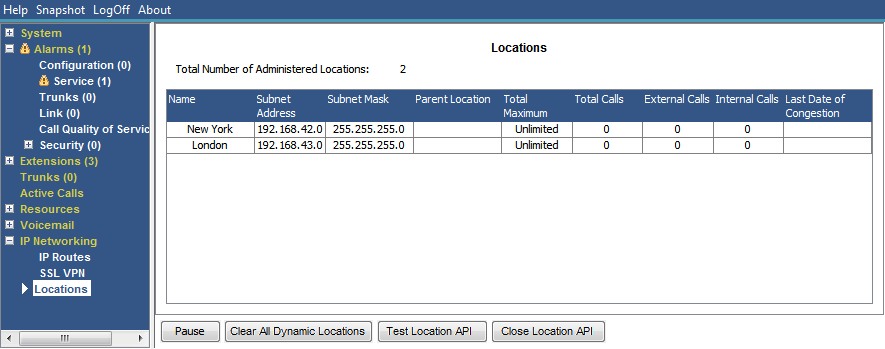
Note that the information shown is applicable only to the system to which System Status is connected. For example, for servers in the same network and configured with the same locations, the call counters are not shared or combined. Note also that the call counters are not preserved even if call control temporarily passes to another server using resilience.
Calls are only counted from their beginning. Therefore, calls taken over by a system providing resilience do not appear in the call count.
Buttons
The following buttons can appear on this screen:
Button |
Description |
|---|---|
Pause |
Stops the screen from updating. The button label and function changes to Resume when the screen is paused. |
Resume |
Resumes updating screen in real time. When pressed, the button label and function changes to Pause. |
Clear All Dynamic Locations |
Third-party applications can use the system's location API to dynamically set the location of extensions. This button clears the dynamic location information currently held for all extension. |
Close Location API |
Close the dynamic extension location API. |
Test Location API |
Test the location API by requesting the dynamic extension location information. |