

AVAYA DOCUMENTATION CENTER
Find answers to your technical questions and learn how to use our products
Migrating to Avaya Contact Center – Extended Capacity
Migration workflow
The following diagram provides a high-level overview of the migration workflow:
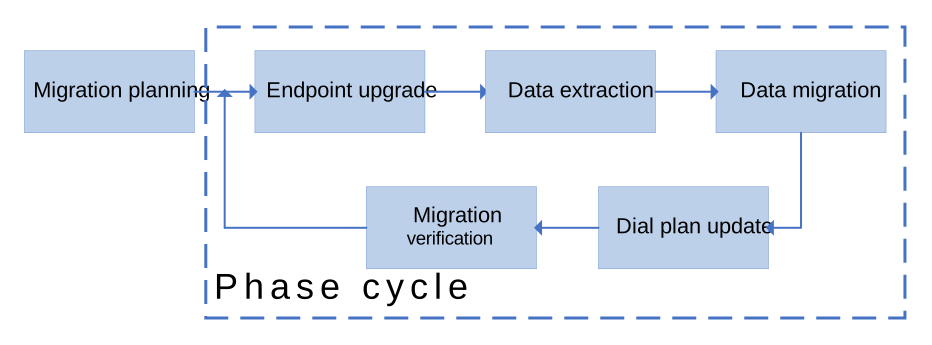
Migration stage |
Description |
|---|---|
Migration planning |
During the planning stage of migration, you must consider the following:
|
Data extraction |
You can use the Extraction Utility to download the data from your previous contact center in the .json file. You must also obtain the audio files for the announcements and Music on Hold to migrate. |
Data migration |
During data migration, you can import contact center data using the .json file that you generated with the Extraction Utility. You must also upload audio files associated with the migrated announcement configuration. When you import data from multiple contact center nodes, the Configuration Server validates the data and lists the duplicate objects in the migration report. You can use the report to locate and delete the duplicate objects manually. |
Endpoint upgrade |
You must upgrade your endpoint firmware to SIP. If you cannot upgrade the firmware, you must replace the endpoints with SIP phones. |
Dial plan update |
During data migration, you can add a prefix to contact center object extensions or numbers to distinguish between data from different nodes of your previous contact center. You need to update the migrated dial plan configuration to include the added prefix. You must also update the dial plan so that the migrated agents and supervisors can make internal calls to contact center users that you have not migrated yet. |
Migration verification |
After migrating contact center data, you must verify your contact center functionality and CMS reporting. |