

AVAYA DOCUMENTATION CENTER
Find answers to your technical questions and learn how to use our products
DITA and Tridion Docs Work Instructions and Guidelines
Adding author name in the deliverable map
When you upload a PDF file to Avaya Support site, you set the following document properties:
-
Author = Avaya LLC
-
Page layout=single page continuous
-
Magnification= 100%
You must add the author name for a publication only once, and every time you publish the PDF, Tridion Docs preserves the author and PDF page property values.
For security purpose, you must add the organization name, Avaya LLC, and not expose the author who created or edited the document.
- Start Publication Manager and open the publication.
STEP RESULT:The Browse Repository window is displayed.
- Right-click the bookmap and select Check out with in Oxygen XML Author.
- In the bookmeta element, add the author element and type Avaya LLC.
ADDITIONAL INFORMATION:
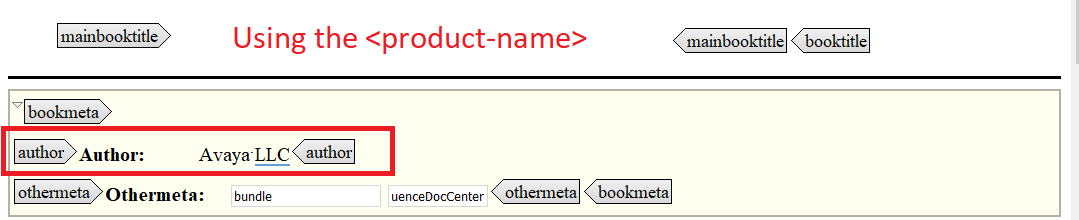
- Click to check in the map.
- Generate the Avaya Book output.
STEP RESULT:The PDF output automatically displays the author and page settings in the document properties.