AVAYA DOCUMENTATION CENTER
Find answers to your technical questions and learn how to use our products
DITA and Tridion Docs Work Instructions and Guidelines
Copying rows and columns from an Excel spreadsheet or Word table
You can copy and paste text into a table in a DITA topics from an Excel spreadsheet or Word table. Russ Pierce contributed this method, which is a much faster way of copying a large amount of content.
Before you begin
Create a table in a DITA topic that has the same number of columns as what you’re copying.
- Select the columns/rows you want to copy and select Ctrl+C.
- Open the topic and position the cursor in the first empty cell in the row where you want to insert the rows.
- Select .
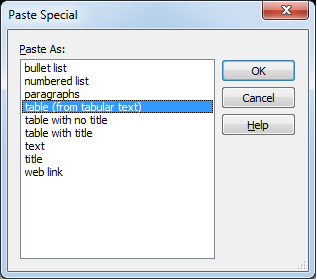
ADDITIONAL INFORMATION:You can also right-click on the position where want to paste the text and select Paste Special from the menu that displays.
- When the Paste Special dialog box displays, select table (from tabular text) and click OK.
ADDITIONAL INFORMATION: