AVAYA DOCUMENTATION CENTER
Find answers to your technical questions and learn how to use our products
DITA and Tridion Docs Work Instructions and Guidelines
Inserting a link to an external topic on Avaya Documentation Center
If you are developing content to publish on Avaya Documentation Center, you can link to a topic that is part of another HTML output already published on Avaya Documentation Center.
The link must be active on Avaya Documentation Center though the target topic is unavailable in the same publication. You can apply the scope=peer attribute on the xref element so that when you produce the HTML output, the system inserts the link without trying to locate the target. If you publish a PDF, the link will be inactive and the link text in the xref element will be formatted as a text reference.
Important:
Do not set the scope attribute to peer on xref elements unless you are publishing to Avaya Documentation Center. If you need to use scope=peer, contact Information Architect.
Before you begin
The target topic must be available in at least one of the publication on Avaya Documentation Center.
- Check out the topic in Oxygen XML Author.
- Place your cursor in the location where you want to add the cross reference and press Enter and insert the xref (cross reference) element.
ADDITIONAL INFORMATION:Alternatively, from the toolbar, click the link icon (
 ) and select Cross Reference.
STEP RESULT:The Cross reference (xref) dialog box is displayed.
) and select Cross Reference.
STEP RESULT:The Cross reference (xref) dialog box is displayed. - Click the Tridion Docs icon (
 ), browse and select the topic that you want to reference.
 - Click Insert and close.
- Double-click the xref element, in the Attributes window, set the scope attribute to peer.
- Click OK.
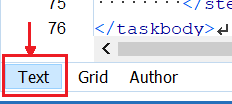
- To add the link text, at the bottom of the editor, click the Text tab, and add the following link text:
ADDITIONAL INFORMATION:
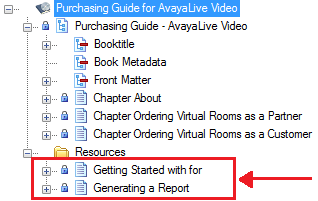
<xref href="<GUID or link to the topic>" format="html" scope="external"><Add link text here></xref> - Add topics that you have referenced with scope=peer to the Resources folder located at the bottom of the publication.
- Open the publication in Publication Manager if not already open, and go to the Contents tab.
- In the desktop repository, locate the topic that you referenced using scope=peer and drag it to the Resources at the bottom of the publication.
ADDITIONAL INFORMATION:Important:Do not include topics under Resources that are not set with scope=peer.