

AVAYA DOCUMENTATION CENTER
Find answers to your technical questions and learn how to use our products
DITA and Tridion Docs Work Instructions and Guidelines
Drawing arrows
To draw arrows in Inkscape, you first draw a line and then you attach the arrowheads to the ends of the line appropriately. If you want to manipulate the line and arrows together, you can group the line and arrowheads into one object.
- Draw a line.
- Click the Selector tool
 and select the line.
 - Select to open the Fill and Stroke panel.
- Click the Stroke Style tab.
- Set the Start Markers to TriangleInL and set the End Markers to TriangleOutL.
ADDITIONAL INFORMATION:
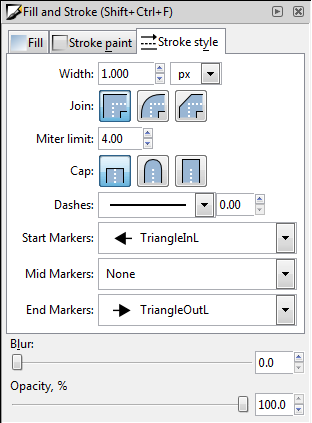 If you don’t want to add an arrow to one end of the line, leave that field set to None.
 - To close the Fill and Stroke panel, click the X in the upper-right corner of the panel.