

AVAYA DOCUMENTATION CENTER
Find answers to your technical questions and learn how to use our products
DITA and Tridion Docs Work Instructions and Guidelines
Drawing lines
- Select the Bezier tool
 .
. - Click (not drag) on the canvas where you want the start of the line and then click again where you want the next point of the line.
- To end the line, press Enter.
- To change the line style:
- Select to open the Fill and Stroke panel.
- Click the Stroke Style tab.
- Set the Width to 1.00 px.
ADDITIONAL INFORMATION:
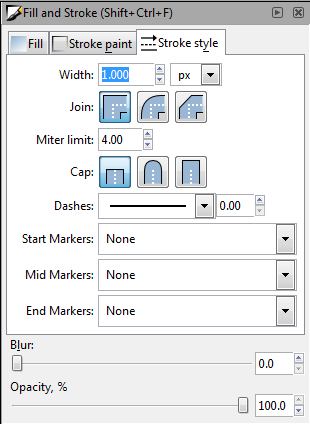
- Modify the other fields as appropriate.
- To close the Fill and Stroke panel, click the X in the upper-right corner of the panel.