

AVAYA DOCUMENTATION CENTER
Find answers to your technical questions and learn how to use our products
DITA and Tridion Docs Work Instructions and Guidelines
Checking the publishing logs for errors
When you produce an output it’s important that you always check the logs for errors. The fact that the output published doesn’t mean that it published without errors such as missing content or broken links.
- When you receive the email that your publishing request completed successfully with an attached zip file, open the ditaot.log file.
- For PDFs, scroll to the end of the file where it says
BUILD SUCCESSFUL
and ensure that the number of Errors is 0. - For HTML outputs, or if there are errors indicated at the bottom of the log, search the log for
[ERROR]
.ADDITIONAL INFORMATION:Searching specifically for[ERROR]
will find all of the DITA Open Toolkit errors. - If you do not receive the notification on the publishing status, view the logs from web interface:
- On the Tridion Docs web interface, navigate to the publication for which the publishing failed, and select the select it.
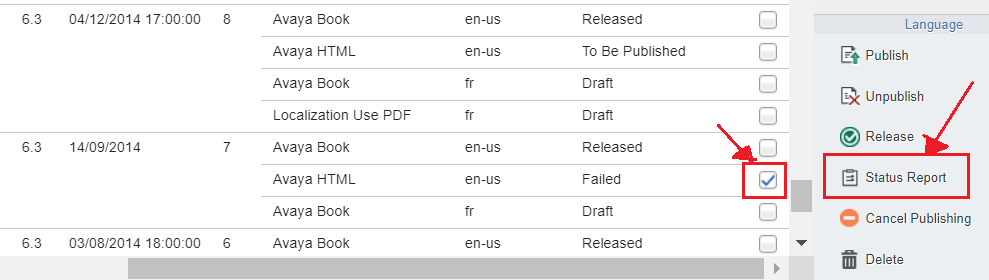
- In the right-bottom pane, select the version, output format, and language by two check boxes.
- On the extreme bottom-right pane, click Status Report.
ADDITIONAL INFORMATION:
- In the Event Details dialog, search for the term,
error
. - Read through the details to identify the cause of the output failure.