

AVAYA DOCUMENTATION CENTER
Find answers to your technical questions and learn how to use our products
DITA and Tridion Docs Work Instructions and Guidelines
Supporting context-sensitive help for HTML outputs without context IDs
If you are developing content for context-sensitive help that does not require context IDs, you can specify the filename or base attribute to be used in the HTML output.
The processor uses the topic title to create the html file during the output generation. For example, the processor creates New_Server_field_descriptions.html file from the New Server field descriptions topic that you share with the development team to map to the product help.
To avoid the underscores in the html file, you can add a base attribute in the topic. During output generation, the processor by default uses the base attribute in the topic and overrides the filename. For example, if you set
NewServerFieldDescas base attribute, the processor creates NewServerFieldDesc.html file from the New Server field descriptions topic.
Some projects map the project help to the topics published on Avaya Documentation Center.
Before you begin
-
Ensure you create a separate publication for the online help deliverable.
-
Use a bookmap as a deliverable map in the publication.
-
If you are reusing an existing Administering or Using bookmap for online help, use appropriate conditions to hide or add content exclusively in product integrated help.
- Open the publication in Publication Manager.
- Check out the topic in Oxygen XML Author.
- Double-click or select the root element, for example, the structure element in a structure topic.
- In the Attributes window, enter the filename to be used in the HTML output, without the extension, in the base field.
ADDITIONAL INFORMATION:For example, if the topic must have the filename NewServerFieldDesc.html in the output, type NewServerFieldDesc in the base field.
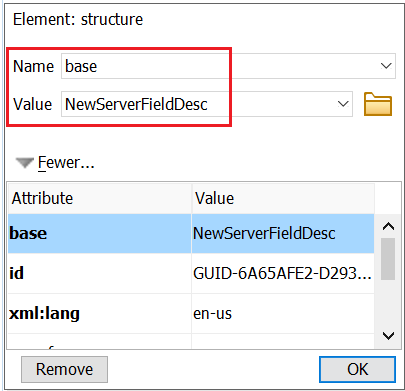 Important:Use only alphanumeric characters, dashes, and underscores in the base attribute—do not use spaces, periods, or special characters. Do NOT include the file extension in the base field. The extension is automatically applied during output generation. Migrated content includes the .dita extension but that is stripped out during output generation. Do not remove the extension from the base attribute from migrated content.
 - Check in the topic.
ADDITIONAL INFORMATION:The Override Output File Name in the topic properties reflects the base attribute value but is not editable. To modify the html file name to be used, check out the topic and modify the base attribute.
- Share the html file name that is identified for mapping on the product help with the developer.
ADDITIONAL INFORMATION:For example, NewServerFieldDesc.html.ADDITIONAL INFORMATION:Note:For projects that map the product help to the htmls published on Avaya Documentation Center, share the entire path, such as https://documentation.avaya.com/bundle/UsingDeviceManagementTool_r31/page/NewServerFieldDesc.html.
- After the developer submits the help to the build, verify that the link works and the content shows up correctly.
Result
When you generate the HTML output, the file name of the topic matches with the base attribute you specified.