

AVAYA DOCUMENTATION CENTER
Find answers to your technical questions and learn how to use our products
DITA and Tridion Docs Work Instructions and Guidelines
Comparing publication versions in the Tridion Docs web interface
You can generate a PDF that displays the differences between two versions of a publication. You can only compare between versions of publications; the compare is not available for revisions within versions.
The publication version comparison only works with the Avaya Book output format.
- Add the Avaya Book output format if you have not already added to the publication in Publication Manager.
- Go to the Repository tab in the Tridion Docs web interface and locate the publication you want to compare versions for.
- Select the check box to the left of the publication for which you want to compare versions.
STEP RESULT:The details of the publication are listed at the bottom of the page.
- Select the check boxes on the left for the version of the publication that you want to use as the basis for the comparison.
- Select the check box on the right side of the page next to the Avaya Book output format.
- Click Properties on the right side of the page.
- In the Publication Output Properties dialog, ensure that Compare with version is checked and select the version for which you want to compare.
ADDITIONAL INFORMATION:
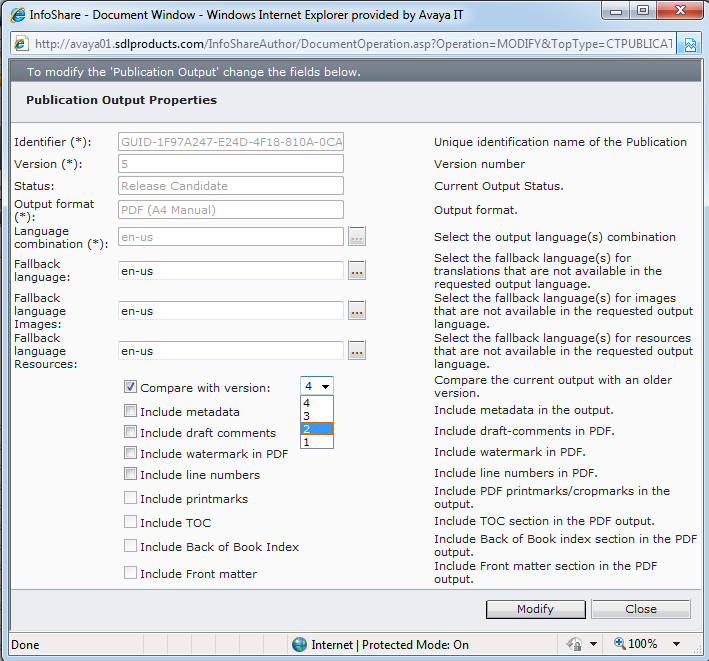
- Click Modify.
- Publish the Avaya Book output format.
- When the publishing request completes, download the output.
STEP RESULT:Content that is added to the version that you selected as the basis appears in green and underlined; content that is removed appears in red and is struck through.