

AVAYA DOCUMENTATION CENTER
Find answers to your technical questions and learn how to use our products
DITA and Tridion Docs Work Instructions and Guidelines
Validator PDF output formatting
The Validator PDF output format highlights specific tagging instances that fall into the following categories Desktop Client:
-
Tags that we should not use
-
Tagging hierarchies that are not a best practice
-
Elements that are not reused that should be reused, especially for content that’s localized.
The following table lists the elements that are highlighted in the Validator PDF output and describes the formatting that’s applied.
|
Element/context
|
Formatting
|
Sample
|
|---|---|---|
|
Elements and contexts that should not be used
|
||
|
<b>: We should never use the bold tag in our content.
|
b: <text>appears in red and in a larger size. |
 |
|
<I>: We should never use the italics tag in our content.
|
i: <text>appears in red and in a larger size. |
 |
|
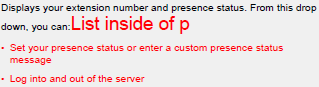
List in a paragraph. List elements should always go after the end of the paragraph.
|
The list appears in red, and the text List inside of pappears in red before the list. |
 |
|
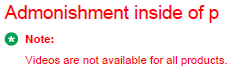
Admonishment (note, warning, etc.) in a paragraph. Admonishment elements should always go after the end of the paragraph.
|
The admonishment appears in red, and the text Admonishment inside of pappears in red before the list. |
 |
|
Ordered list <ol> in a step.
|
The list appears in red, and the text Ordered list inside of stepsappears in red before the list. |
 |
|
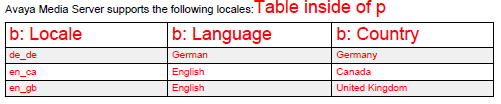
Table in a paragraph.
|
The list appears in red, and the text Ordered list inside of stepsappears in red before the list. |
 |
|
Empty <p>, <abstract>, <title>, <shortdesc> elements
|
The element appears in red with the text Empty <element name>. |
 |
|
Elements that should not be reused
|
||
|
<ph> element that is conref’d. Do not reuse the <ph> element.
|
The element appears in red with the text Conref not allowed on ph: <reused content>. |
 |
|
Elements that should be reused
|
||
|
<product> element that’s not conref'd. Reuse of product names is required.
|
Highlighted in bright green.
|
 |
|
<application> element that’s not conref'd. Reuse of application names is required.
|
Highlighted in bright green.
|
 |
|
<uicontrol> element that’s not conref'd. Our best practice is to reuse <uicontrol> elements. For new projects and localized content, this is required
|
Highlighted in blue.
Reusing <uicontrol> and <wintitle> elements is required for new projects and existing projects that are localized. It’s strongly encouraged for all other projects but not mandatory at this time. Highlighting the <uicontrol> elements that are not conref'd can also help locate <uicontrol> elements that have been used improperly to apply bold formatting.
|
 |
|
<wintitle> element that’s not conref'd. Our best practice is to reuse <wintitle> elements. For new projects and localized content, this is required.
|
Highlighted in light purple.
|
 |
|
<version> element that’s not conref'd. Our best practice is to reuse <version> elements. For new projects and localized content, this is required
|
Yellow highlighting
|
 |
|
Change tracking
|
||
|
Change tracking is enabled in a topic.
|
The text Change tracking is active in the next topicappears in red before the topic. Change tracking is fine while you’re developing the content, but it’s very important that it be turned off before you deliver content to Localization or you deliver and release the final content. |
 |
|
There is change tracking markup in a topic.
|
The text Change markup is present in the next topicappears in red before the topic. It’s very important that you resolve and change tracking before you deliver content to Localization or you deliver and release the final content. |
 |