

AVAYA DOCUMENTATION CENTER
Find answers to your technical questions and learn how to use our products
DITA and Tridion Docs Work Instructions and Guidelines
Locating a GUID referenced in a publishing log error
When you produce an output from Tridion Docs, you receive a notification message when the publishing request completes. You must always open the log and look for errors. The error message uses the GUIDs of the objects in many cases and it might be difficult to determine which topics or maps the error is referencing.
- When you receive the email notification from Tridion Docs, open the log file and search for the
error
word.ADDITIONAL INFORMATION:The following is a sample of common error:[xslt] [DOTX006E][ERROR]: Unknown file extension in href: 'GUID-93A613C9-3646-4104-849E-F52017049DB6'. If this is a link to a non-DITA resource, set the format attribute to match the resource (for example, 'txt', 'pdf', or 'html'). If it's a link to a DITA resource, the file extension must be 'dita' or 'xml'. Set the format attribute and specify the format of the file if href link doesn't point to dita topic file. Otherwise, change the file extension name to 'dita' or 'xml'.The location of this problem was at (File = W:\InfoShare\Data\PublishingService\Data\DataExports\GUID-570C1EE4-F4A9-4A89-BF6F-DA9DC6C3886E.20130123195114668\1\en-us\workset\GUID-B57F8CAC-246F-4327-A81A-6EEDA79B879F.ditamap, Element = topicref:12)The sample error indicates that there is an issue with a topicref in a map. The issue is specifically with the 12th topicref in GUID-B57F8CAC-246F-4327-A81A-6EEDA79B879F . And the object being referenced in the topicref is GUID-93A613C9-3646-4104-849E-F52017049DB6. - To identify the objects, go to the Search tab in the Tridion Docs desktop repository.
- Expand the Advanced Options.
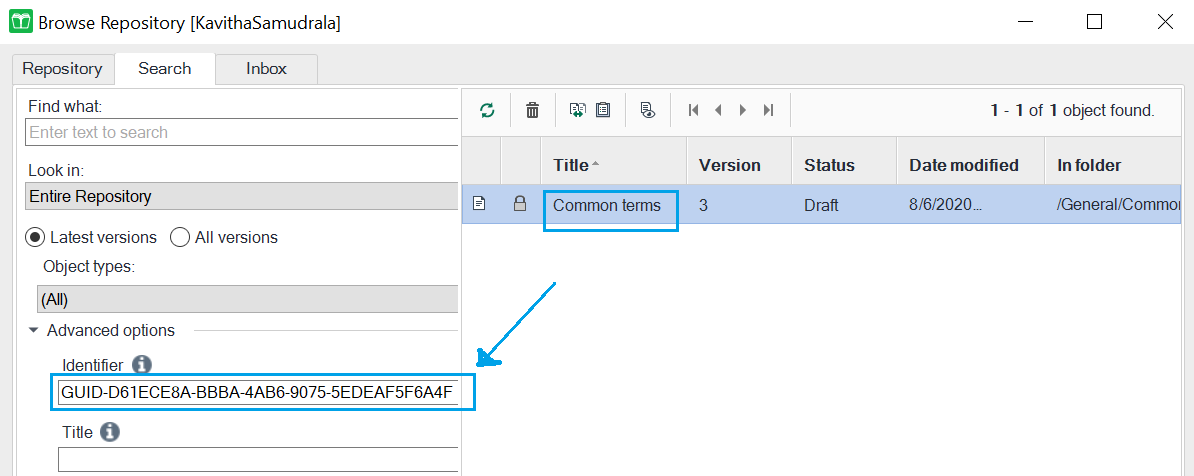
- Copy and paste the GUID in which the issue occurs in the Identifier field and click Search.
ADDITIONAL INFORMATION:If the GUID refers to a DITA Map, do not include the extension in the Identifier field.STEP RESULT:The Browse Repository window displays the name and location of the object in the results pane on the right side of the page, similar to the following sample.
- Repeat Step 4 to identify the object that is causing the error.