

AVAYA DOCUMENTATION CENTER
Find answers to your technical questions and learn how to use our products
Using IP Office SoftConsole
BLF panel
The Busy Lamp Field (BLF) panel displays named icons that represent dialable numbers. If the icon is for an internal user, the user’s status is indicated.
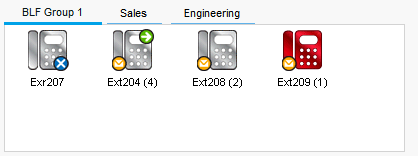
The panel uses tabs to group different sets of user icons. You can switch between the groups by clicking the tab name.
The icons used for users are:
Icon |
Description |
|---|---|
|
Unread Voicemail Messages A yellow envelope indicates that the user has unread voicemail messages. The number of messages appear in brackets. |
|
User Busy A red circle with white cross indicates the user is busy. |
|
Forwarding All A green circle with a white arrow indicates that all calls to the user are currently being forwarded. |
|
Do Not Disturb A blue circle with white cross indicates that the user has Do Not Disturb switched on. |


