

AVAYA DOCUMENTATION CENTER
Find answers to your technical questions and learn how to use our products
Using IP Office SoftConsole
Monitoring queues
About this task
Hunt groups can be configured with queuing. When there are more calls waiting to be answered than agents available to answer, the additional calls are put into a queue. You can configure your console to monitor up to 8 hunt group queues.
The number of calls held in a queue is indicated by a bar graph.
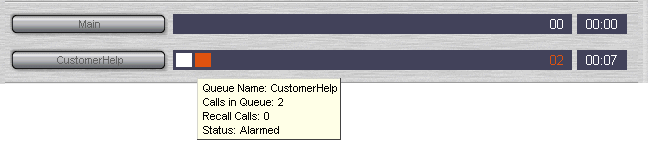
The total number of calls is shown at the end of the bar graph. Each call is shown as a white box if the alarm threshold has not been exceeded. If the number of calls in the queue exceeds the alarm threshold, the calls exceeding the threshold are shown as an amber box.
The longest length of time a call is in the queue is indicated in the text box at the end of the graph. The time is updated whenever a call is queued. The time is shown in white if the longest wait time alarm threshold has not been exceeded. The time changes to being amber if the longest wait time is exceeded.
Procedure
Move the mouse pointer over an active Queue Call bar to show information about the queue.
The following information appears:
Queue Name
Calls in Queue
Recall Calls
Status