

Customizing the console’s appearance

Last Updated : Mar 10, 2024 |

About this task

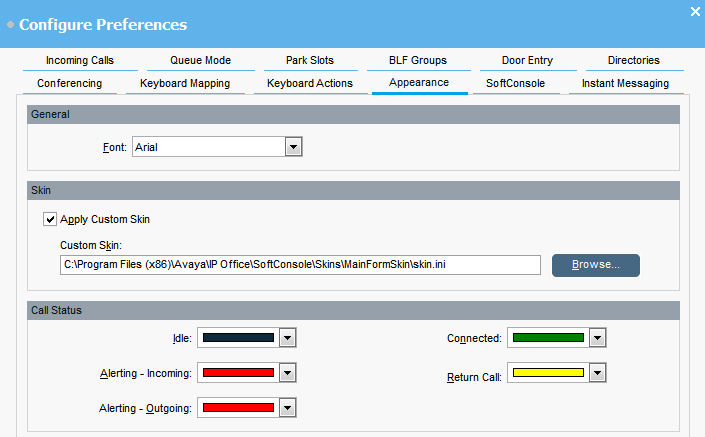
You can change the general appearance of the console application. For example, you can change font and colors used to indicate call status.


Before you begin

If you want to use a custom skin, you must have a skin definition file.

Procedure

  1. Click Preferences Preferences.
  2. Select Appearance.
  3. Optional Select a new font from the Font drop-down menu.
  4. Optional If you want to select and use a custom skin, select the Apply Custom Skin check box.

    A skin is a set of files defining the whole appearance of the application. By default, no additional skins are supplied.

    1. Click Browse and upload your skin definition file.
  5. Optional Change the call status colors.

    You can select a different color for each call status. These colors appear in the border of the call details panel. The available call status options are:

    • Idle

    • Alerting - Incoming

    • Alerting - Outgoing

    • Connected

    • Return Call