

AVAYA DOCUMENTATION CENTER
Find answers to your technical questions and learn how to use our products
DITA and Tridion Docs Work Instructions and Guidelines
Workflow
With the workflow feature in Tridion Docs, you can manage the content development process. Every object in Tridion Docs such as topic, map, and image must move through specific workflow states. Because each object has a workflow, you can manage the content development process at the topic level rather than as a book or help system. When a topic, map, or graphic is complete, reviewed, and approved, you can change the workflow state for that object to Released. Releasing chunks of content is relevant in an Agile methodology. You must also release objects before translation.
Workflow states
The following chart shows the sequence of workflow states and the role responsible for each change in state.
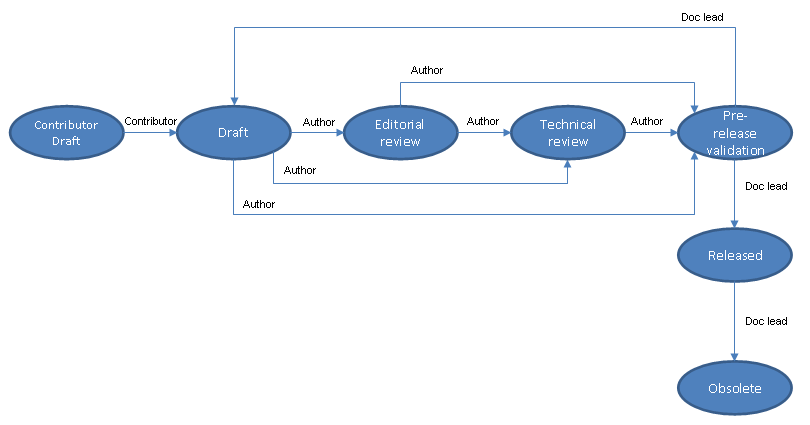
The following table describes each state in the workflow.
Sequence in flow |
Workflow state |
Description |
|---|---|---|
1 |
Contribute |
Only for a non-GIS resource to contribute content by using Content editor, such as RWS Collective Spaces. Avaya does not use RWS Collective Spaces currently. |
2 |
Draft |
Initial default state of all new objects. Objects are in draft state during the development phase. |
3 |
Editorial Review |
Content that is in review. Reviews can include reviews by the GIS editors, informal peer reviews, a CE review, or a DITA content review. You can use the Reviewer field in object properties to indicate the internal resource performing the review. |
4 |
Technical Review |
Content that is going through a technical review. |
5 |
Pre-Release Validation |
Content in which all required quality checks and reviews are validated. |
6 |
Released |
Content that is complete. When content is in the Released state, it cannot be modified.
Important:
User with Doc Lead role can change content from Pre-Release Validation state to Release state. |
7 |
Obsolete |
Content that is no longer used in new deliverable. You cannot delete the object because it is used in frozen baselines. |
Note:
You can change the workflow status on multiple objects simultaneously by using the following:
Workflow from web interface
Browse repository
Publication Manager baseline
Move content object through each relevant state so that we can view the progress of the content development in Tridion Docs. Some workflow states, such as Pre-release Validation state are mandate, therefore, you cannot skip this step. Objects must have the Pre-release Validation state before you can release them.
Roles
As an author, you manage most of the workflow states for your content, but only the Doc Lead role can make the final transition, from Pre-Release Validation to Released. The Doc Lead role is intended for someone who is responsible and accountable for validating that the content has gone through all necessary quality checks, testing, reviews. The author or another team member can take this role.