AVAYA DOCUMENTATION CENTER
Find answers to your technical questions and learn how to use our products
DITA and Tridion Docs Work Instructions and Guidelines
Accepting or rejecting changes in topics
You can accept or reject changes in topics any time in Oxygen XML Author. For example, you might clear changes when you are ready to produce an output for a final delivery or if you want to clear any changes after a draft delivery and start tracking new changes.
About this task
Important:
You must resolve any changes in topics before you deliver content to Localization or produce a final output.
Before you begin
Change tracking is enabled and changes made to the content.
Procedure
- Do one of the following options:
To accept all of the changes in the topic, from the toolbar or , click
 Accept all changes.
To reject all of the changes in the topic, from the toolbar or , click
 Reject all changes.
To move through the changes and accept or reject them individually, click
 Accept Changes and Move to Next or
  Reject Changes and Move to Next for each change.
If you want to change whether additional changes you make are tracked, you can enable or disable change tracking.
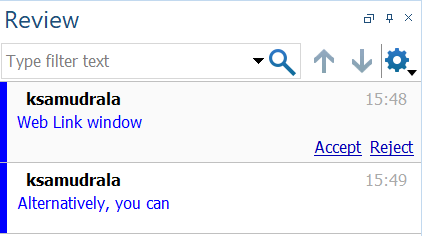
Alternatively, you can perform the following steps to accept or reject changes.
- In the Review window, click
 (down arrow), for each change, click Accept or Reject.