AVAYA DOCUMENTATION CENTER
Find answers to your technical questions and learn how to use our products
DITA and Tridion Docs Work Instructions and Guidelines
Identifying migrated topics with duplicate Tridion Docs titles
About this task
Tridion Docs uses titles instead of file names to manage topics. When content is converted from Astoria to Tridion Docs (erstwhile Trisoft), the DITA topic title is used as the Tridion Docs title. Topics in your publications in Astoria with duplicate DITA titles have duplicate Tridion Docs titles when they got migrated to Trisoft.
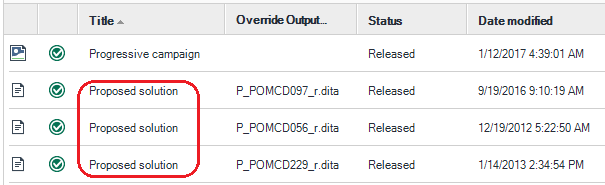
The duplicate Tridion Docs titles do not cause an error. However, might make it difficult for you to differentiate the topics. Therefore you can use the Override Output File Name field. This field is populated during migration with the filename that was used in Astoria or the name you assigned to the topic to support context-sensitive help in an HTML output.
Procedure
- Look at the Override Output File Name in the second column to differentiate the topics, based on what it was named in Astoria or the filename that was specified to the topic for context-sensitive help.