

AVAYA DOCUMENTATION CENTER
Find answers to your technical questions and learn how to use our products
DITA and Tridion Docs Work Instructions and Guidelines
Publication Manager crashes while opening a publication
Condition
Publication Manager crashes while opening a publication.
Publication fails to open.
Cause
Publication either takes unusually longer to open or fails to open due to multiple circular references within topics. If the number of recursions cross the threshold in a publication, Publication Manager crashes before the publication opens.
You must avoid these loops by removing the circular references.
The following are some examples of circular references in the order of severity:
Para A from Topic 1 referenced in Topic 2, para B from Topic 2 referenced in Topic 3, and para C from Topic 3 referenced in Topic 1.
For example, a step from
Adding users
topic is referenced inEditing users
topic, a paragraph fromEditing users
topic is referenced inDuplicating users
topic, and a step fromDuplicating users
topic is referenced inAdding users
topic.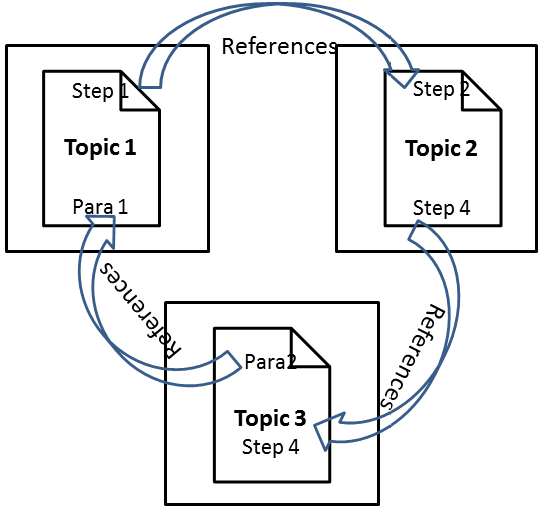
Step 1 from Topic 1 referenced in Topic 2, Step 2 from Topic 2 referenced in Topic 1.
For example, a step from
Adding users
topic is referenced inEditing users
topic, and a paragraph fromEditing users
topic is referenced inAdding users
topic.A para or a step from a topic referenced in the same topic.
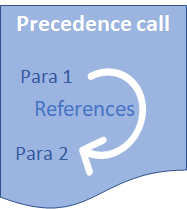
Circular references also applies to content references made by using xref element.
Solution
Procedure
- Note the topics with circular references:

- If the content is referenced in the same topic, do one of the following:
- If a simple paragraph or a step is reused, copy from the first location, and paste in the second location.
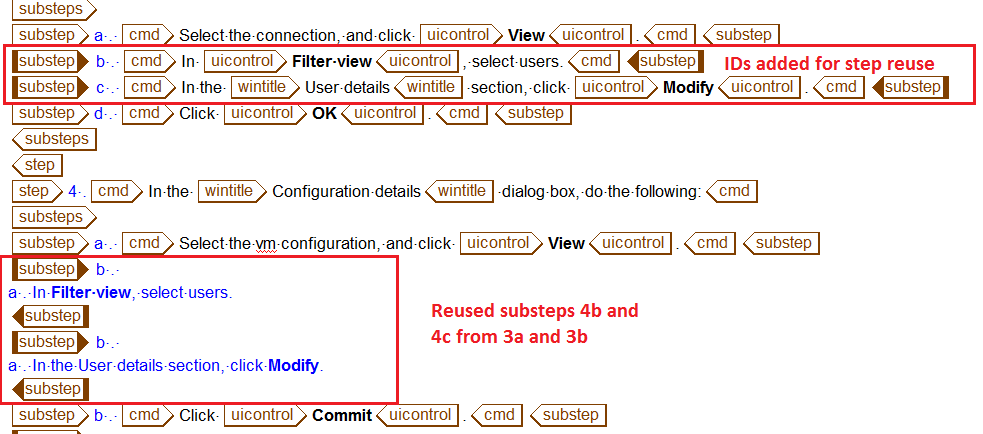
- If a simple paragraph or a step is reused, copy from the first location, and paste in the second location.
- If the first topic references content from the second topic, and the second topic references content from the third topic, and the third topic references content from the first topic:
- Reuse the appropriate content from the common topic in three topics.
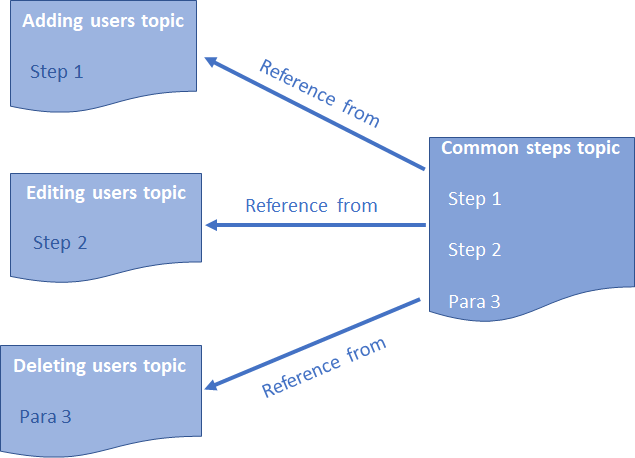
Important:In a common topic, do not reuse content from other common topics. Because common topics are used across publications and programs, reuse from other common topic multiplies the references very quickly causing loops resulting in delays in opening publication or publication crashes.
The only exception is common topics: Product names, Applications, Snapin-names, and Languages.
- Reuse the appropriate content from the common topic in three topics.
To prevent circular references, when you reuse content:
Always make references to common topics instead of the peer topics used in the project.
Ensure that the direction of references must be in the direction depicted in the image.
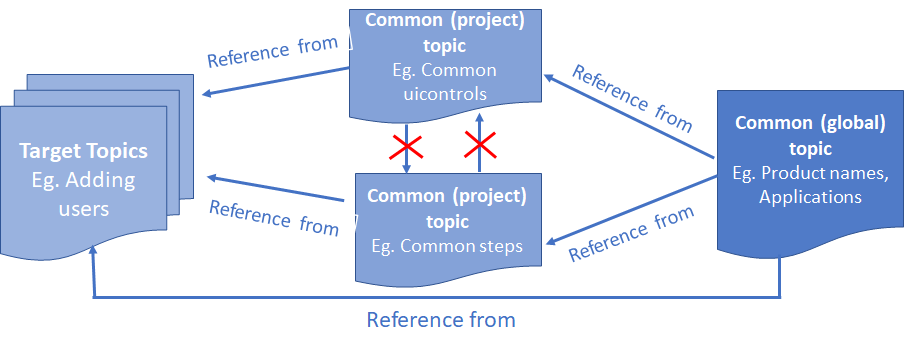
For example, add frequently used content, such as steps, uicontrols, and wintitles in a common topic and reuse the content in Adding users, Editing users, and Deleting users. Do not reuse content from the Adding users topic in the Editing users topic.