

AVAYA DOCUMENTATION CENTER
Find answers to your technical questions and learn how to use our products
DITA and Tridion Docs Work Instructions and Guidelines
Defining topic sequence linking for an HTML output
Use this procedure to define a topic sequence in a DITA Map that will display as next and previous topic links at the bottom of the topics in an HTML output.
Procedure
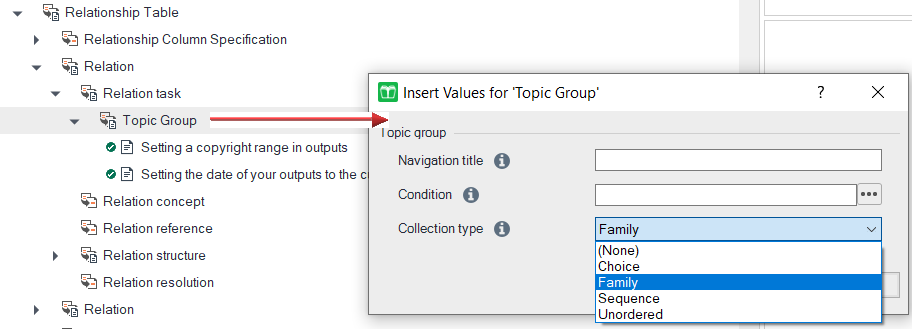
- When the Insert Values for Topic Group dialog box, displays:
- Select Sequence as the Collection type.
- If the map is also being included in the PDF and you don’t want the related links to appear in the output, set the Condition to HTML.
- Click OK.
If you didn’t set up a topicgroup separately from the topic hierarchy, as noted in step 2, skip the following step.