

AVAYA DOCUMENTATION CENTER
Find answers to your technical questions and learn how to use our products
DITA and Tridion Docs Work Instructions and Guidelines
Image guidelines
Conventions
Use 1920x1080 screen resolution without any upscale when taking screenshot.
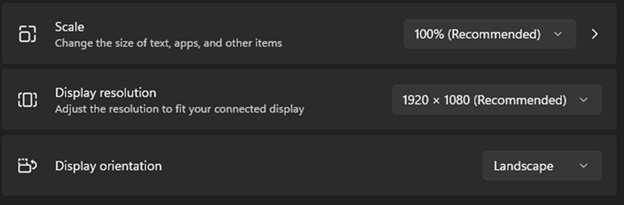
Ensure the image is not more than 6 inches width and 10 inches length. If you do not include a title for the figure, you can keep the length up to 10.25 inches.
Note:If the image is larger than the text box, it is automatically scaled during production to fit if the placement attribute is set to break on the graphic.
Resize images using the source tool. However, you can use attributes on the image element to scale an image in the output.
Ensure that the font size is 14, see step 4 in Embedding text in an object for more information.
The Localization team might need to reduce font size to fit longer translated strings into image objects.
File naming conventions for images
Use the file naming conventions that you use for your XML/DITA files. The file name need to be meaningful, in camel-case with no spaces. For example, use VustatsDisplayExample
. Avoid using file names that imply a logical or hierarchical order. For example, do not name your files as Fig2-2 or Chap3Image. The location of your image might change and this naming convention will not make sense if the image is reused in other deliverable or media.
Supported images formats
You can include the following image formats in DITA topics:
png
gif
svg
Important:
HTML and HTML5 outputs do not support eps (Encapsulated PostScript) images. Therefore, you cannot view these images in the HTML files opened in browsers. You must convert eps images to the png format by using applications, such as Inkscape and Adobe Illustrator.
Scalable vector graphics (SVG) is an XML-based image format with the following benefits:
SVG is a vector-based format rather than bitmap-based, such as png and gif. Vector-based graphics, line drawings and text in specific, do not lose image quality when scaled.
SVG has higher resolution than the image formats we currently use.
Because SVG is XML-based, the text in SVG can be translated to different languages.
Use the Inkscape software that is freely distributed to create and edit an SVG image. For instructions to create SVG using Inkscape, see Creating SVG images using Inkscape.
Text in drawings
Do not embed text in png or gif drawings unless the drawing does not make sense without callouts. You can embed text in SVG images that can be translated to various languages.
When uploading images in Tridion Docs, only select the Enable translation management check box for SVG images with embedded text. Do not select this check box for other image types that are not localized.
DITA elements for images
You can use one of the two ways to tag an image within a DITA topic:
Image element if you do not need to add supporting information, such as a title or legend for call-outs (simpletable element) with your image.
Image element inside a fig element to:
Include a title or description (desc element) with your image.
Provide a legend for your call-outs in simpletable element.
Accessibility
Ensure that you include an alt element inside the image element to make the image accessible for users using screen readers or text-only readers.
Placement attribute
When you insert an image into a topic, use the placement attribute to determine if the image breaks to a separate page in the output when appropriate or always stays with the text around it:
Set the placement attribute to break when the image must be independent of the text around it and break to a new page in the output when appropriate. Use break in almost all cases.
Set the placement attribute to inline when the image must stay with the text around it. This value can cause awkward page breaks in outputs and must only be used when an image is nested within text. Do not use the Inline attribute.
When the placement attribute is set to break, images that are large for the page are automatically scaled to fit in the text box.
Test image in the output
Generate the output and verify how the image is displayed. The way the image displays in Editor is not always a true representation of how it appears in an output.