

AVAYA DOCUMENTATION CENTER
Find answers to your technical questions and learn how to use our products
DITA and Tridion Docs Work Instructions and Guidelines
Branching best practice
Create branches of objects to update content for older product releases.
You must follow the correct branching practices of objects in Tridion Docs when working on various product releases. This applies to all objects, such as publications, bookmaps, maps, and topics.
Create only versions from the latest version
Create a branch to modify the content from the older topic, map, or publication version for older product releases and you have already started work on the new release.
Correct |
Incorrect |
|---|---|
Create a new v9 from v8 for product release 8.0 Create a new v10 from v9 for product release 8.1 |
Branch created from the latest available topic, map, or publication v8 |
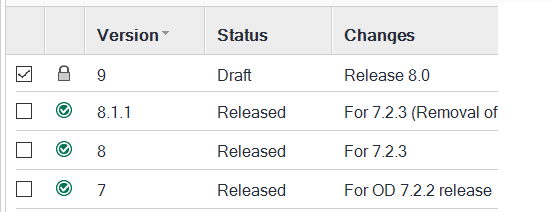
|
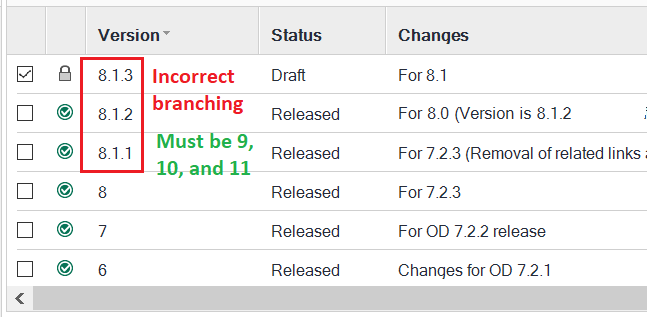
|
Localization projects
For localization projects, you might have more than one version for the publication and map/topics within it for each product release. For example:
V12 for Product Release 8.1 [Draft and work in progress]
V 11 for Product Release 8.0 GA
V 10 for Product Release 8.0 [Object released for localization 100% drop]
V 9 for Product Release 7.2.3 updates
V 8 for Product Release 7.2.3 [Object is released and content frozen]
Why should you avoid branches
Branches are not visible in the repository and the publication baseline
Branches are easy to miss out
The next main version does not reflect the changes made in the branch.
In the example, version 9 does not reflect the changes from version 8.1.1, 8.1.2, and 8.1.3. You must add changes made in the branch again in version 9, which the writer might easily miss out thus making the content incomplete in the latest versions.
You can view the branch only from the Version field in the repository and the Version selection pane in Publication Manager
When should you create a branch
Create a branch from the older version of the publication, map, or a topic:
When you already have a draft version for the current product release
When you need to update the content for the older product releases
Note:
In all other scenarios, create versions only.