

AVAYA DOCUMENTATION CENTER
Find answers to your technical questions and learn how to use our products
Avaya Oceana® Solution Description
Callback Assist
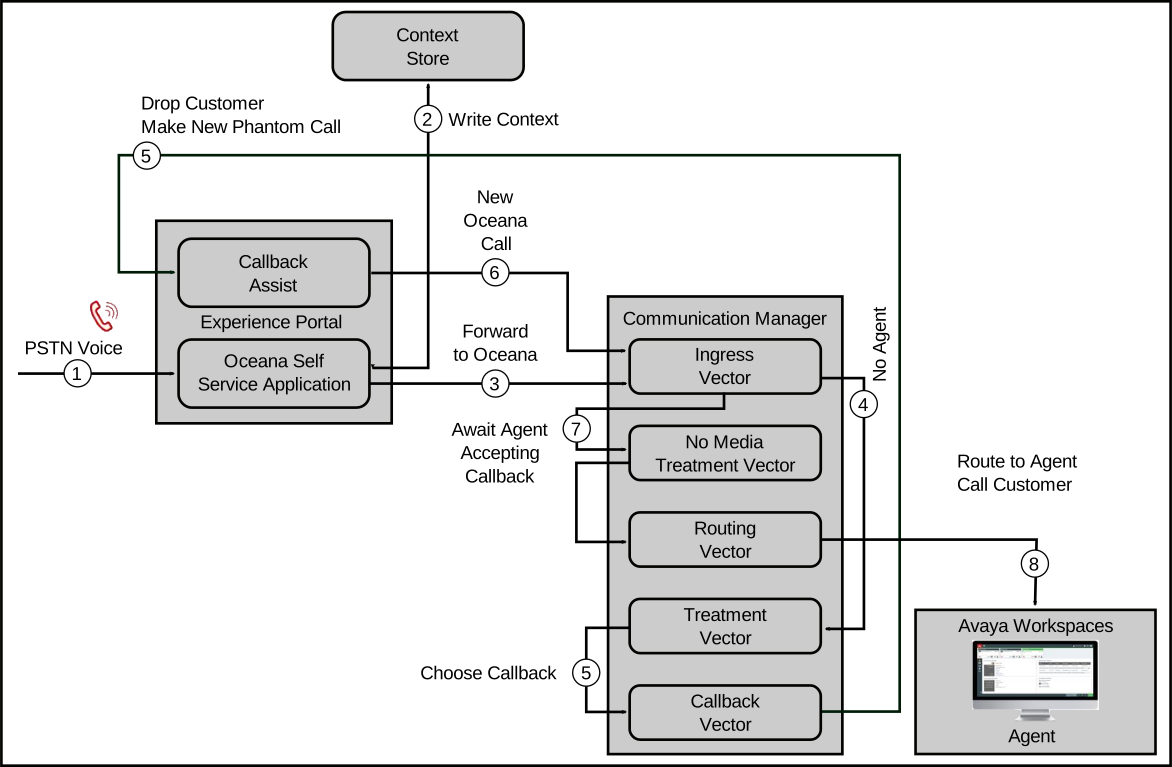
Avaya Oceana® provides callback functionality. If Avaya Oceana® does not find an available agent during a voice call, the caller is presented with the option to leave a voicemail or request a callback. If the caller selects the callback option, the caller is dropped from the call, and Callback Assist makes a new media-less call to Avaya Oceana® for routing to a suitable agent. After the agent answers the call, the customer is dialed and connected to the agent.
Callback Assist integrates with Avaya Oceana® at the callback state. Instead of bridging Callback Assist and Experience Portal into the call throughout, Callback Assist integration occurs within the Treatment vector.
Calls are initially front-ended and then transferred to Call Center Elite for assisted service. If no agent is available, calls are given advanced wait treatment using Communication Manager vectoring. Callers are periodically presented with the option to leave a voicemail or request a callback. After a caller selects the callback option, the call is routed to Callback Assist, where Immediate or Scheduled callback options are selected, and the call is dropped.
For the Immediate callback option, Callback Assist makes a new media-less call to Avaya Oceana® for routing to a suitable agent. After the agent answers the call, Callback Assist dials the customer number and connects the call to an agent.
The callback call from Callback Assist must not receive any media treatment while awaiting an agent. If media is accidentally provided, it establishes a SIP dialog, and Callback Assist treats this as an agent answer. Therefore, you must configure a No Media treatment vector. The No Media treatment VDN is used when the incoming call is a callback, instead of to a regular customer call.
From the agent and customer, the first party whom Callback Assist must call depends on an install-time option that cannot be changed through configuration. You can change this option only through an upgrade.
Callback Assist currently supports PSTN Voice but does not support Web Voice and Web Video.
The following diagram depicts the Callback Assist flow:
For more information about how to configure Avaya Oceana® and Callback Assist integration, see Deploying Avaya Oceana®, available from the Avaya Support website at https://support.avaya.com.