

AVAYA DOCUMENTATION CENTER
Find answers to your technical questions and learn how to use our products
Avaya Oceana® Solution Description
Post Call Survey
Avaya Oceana® provides the Post Call Survey feature. With this feature, the caller can provide a rating based on the interaction with the agent.
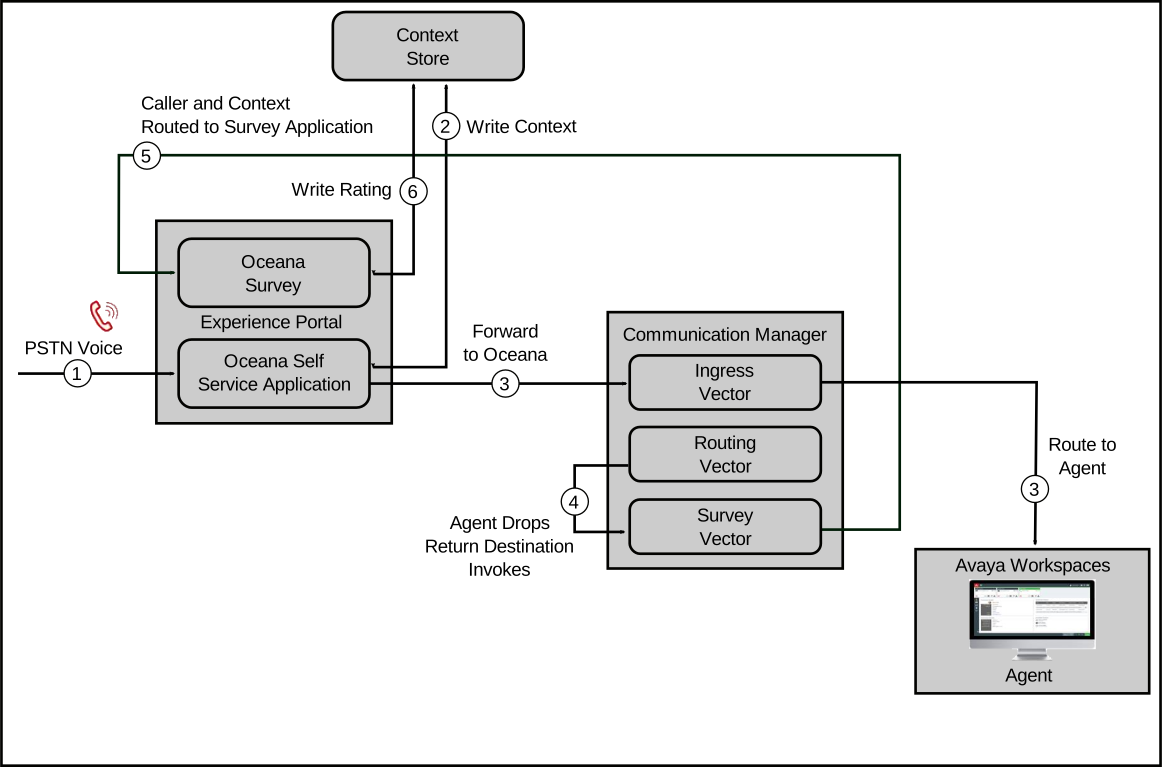
Using this feature, Avaya Oceana® can connect with an external survey application to solicit feedback from a customer after the customer completes the call with an agent. This feature builds on the VDN Return Destination feature of Communication Manager to first direct the calls to a Survey Vector Directory Number (VDN) and then to an application such as Experience Portal.
When Communication Manager detects that the agent is dropped from a voice call, the customer is kept connected and is directed to the configured survey application. However, calls that cancel in coverage or callback must not connect to the survey application. Therefore, you must administer Vector Return Destination (VRD).
Avaya Oceana® provides a sample Experience Portal application named OceanaSurvey. This application is intended to demonstrate how to retrieve the following details from the customer:
Account ID
Agent ID of the agent who interacted with the contact
Disposition of the contact
The caller is prompted for a rating from 0 to 9. This rating is stored in the customer’s journey along with the other context from the call.
The following diagram depicts the Post Call Survey flow:
When configuring this feature, you must correctly configure the Allow VDN Override parameter to ensure that callers get the survey at the right instances. For example, you must not provide a survey to a customer who has requested a callback without speaking to an agent.
VDN Override is a Communication Manager Call Center Elite feature that enables information of the subsequent VDN where a call is routed instead of the information of the previously-active VDN. If a VDN is configured with the Allow VDN Override parameter as no, it maintains ownership of the call throughout the routing process. Therefore, when the agent receives the call, all call data is transferred to this VDN.
The following configuration supplies a post-call survey to the caller in the following situations:
Survey Applied |
Vector |
Comment |
|---|---|---|
Yes |
Ingress > Routing |
Agent surplus |
Yes |
Ingress > Treatment > Routing |
Call surplus |
No |
Ingress > Treatment > Callback |
Caller requests callback |
No |
Ingress > Treatment > Coverage |
Caller chooses to leave a voicemail |
No |
Ingress > Fallback |
Routing error occurred or Avaya Oceana® out-of-service |
Yes |
Ingress > Routing > Transfer > Routing |
Call transfer, Agent surplus |
Yes |
Ingress > Routing > Transfer > Treatment > Routing |
Call transfer, Call surplus |
No |
Ingress > Routing > Transfer > Treatment > Callback |
Call transfer and then callback |
No |
Ingress > Routing > Transfer > Treatment > Coverage |
Call transfer and then voicemail |
RONA not shown |
- |
At any point, RONA follows the above rules |
You must configure the Allow VDN Override and Return Destination parameters for Avaya Oceana® VDNs as follows:
VDN |
Allow VDN Override |
Return Destination |
|---|---|---|
Ingress |
Y |
Not Set |
Treatment |
Y |
Not Set |
NoMedia |
Y |
Not Set |
Routing |
Y |
Set to Survey VDN |
RONA |
Y |
Not Set |
Transfer |
Y |
Not Set |
Fallback |
N |
Not Set |
Callback |
N |
Not Set |
Coverage |
N |
Not Set |
Survey |
N |
Not Set |
Note:
If a survey is not required, you must configure the Allow VDN Override parameters according to this table. However, the Return Destination parameter on the Routing vector can be omitted. With this configuration, customers can quickly enable or disable surveys using a single setting.
For more information about how to configure Avaya Oceana® and Post Call Survey integration, see Deploying Avaya Oceana®, available from the Avaya Support website at https://support.avaya.com.