

AVAYA DOCUMENTATION CENTER
Find answers to your technical questions and learn how to use our products
Avaya Oceana® Solution Description
Data redundancy and disaster recovery
Avaya Oceana® disaster recovery provides a planned approach to re-establish a critical service at a secondary data center when a complete outage occurs at the primary data center.
Avaya Oceana® supports disaster recovery in two failure modes:
Unplanned complete data center outage
Planned complete data center outage
Avaya Oceana® disaster recovery solution ensures that the servers on the remote geographic site maintain a near real-time local copy of the active configuration databases and server configuration on the main site. During a complete outage of the main data center, a customer can carry out a sequence of manual steps at the standby site to restore the Avaya Oceana® Contact Center service. The secondary site contains an up-to-date copy of the required administration and reporting data so that when the solution is restarted, the customer can continue the business.
The Avaya Oceana® and Avaya Analytics™ Disaster Recovery document provides information on how to configure a geographically redundant Avaya Oceana® so that when a primary data center outage occurs, the redundant site can be made operational. The secondary site has an updated copy of the required administration and reporting data so that the operations are not affected.
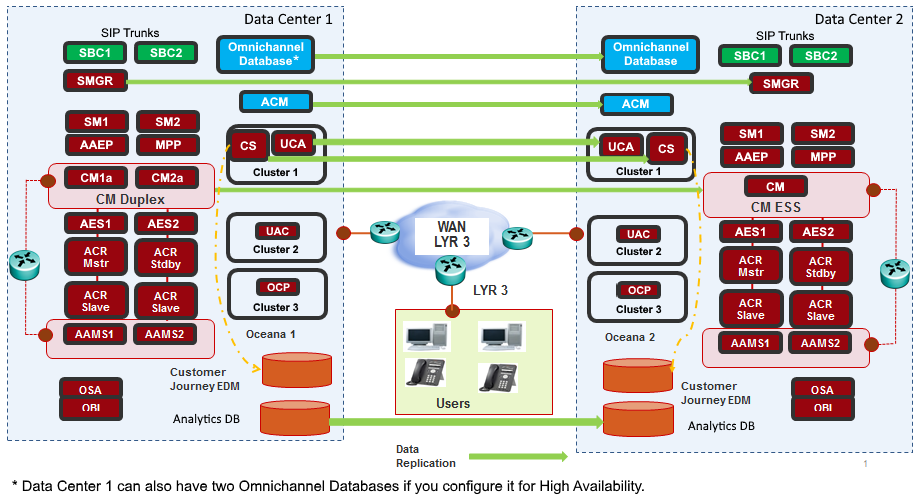
The following diagram depicts the high-level architecture of Avaya Oceana® disaster recovery:
Note:
The primary data center is referred to as Data Center 1 and the secondary data center as Data Center 2.
The following components support data replication:
Configuration data stored in Unified Collaboration Administration (UCA) including users, accounts, work assignment attributes, and attribute assignments
Configuration data stored in the Omnichannel database
Customer journey data in Avaya Context Store Snap-in
Avaya Control Manager data stored in the SQL server database
Avaya Analytics™ reporting data
During a total outage of the main site, the administrator follows a manual procedure to start both Avaya Oceana® or Avaya Analytics™ on the remote geographic site. Using the instance of Avaya Oceana® at one site and the instance of Avaya Analytics™ at the other site is not supported. Avaya Oceana® and Avaya Analytics™ must be running on the same site.