DOCSHUB DOCSHUB
  • Library
  • Avaya Support Site Avaya Learning Blogs Videos & Podcasts Knowledge base Report Product bugs
Deutsch English Español (México) Français Français (Canada) Italiano Magyar Nederlands Português (Brasil) Русский עברית العربية 中文(简体) 中文(繁體) 日本語 한국어
Login
DOCSHUB DOCSHUB
  • Library
  • Avaya Support Site Avaya Learning Blogs Videos & Podcasts Knowledge base Report Product bugs
  • Deutsch English Español (México) Français Français (Canada) Italiano Magyar Nederlands Português (Brasil) Русский עברית العربية 中文(简体) 中文(繁體) 日本語 한국어
Login

Deploying Avaya Experience Platform™ (On-Prem + Connect)

Table of Contents

Type to filter navigation items by title
  • Notices
  • Introduction
    • Purpose
  • Overview
    • Avaya Experience Platform (On-Prem + Connect) solution overview
    • Avaya Experience Platform (On-Prem + Connect) solution components
      • Avaya Hybrid Cloud Gateway overview
    • Avaya Experience Platform (On-Prem + Connect) hybrid architecture
    • Avaya Hybrid Cloud Gateway overview
  • Deployment process
    • Deployment process flow
    • Ordering Avaya Experience Platform (On-Prem + Connect)
  • Planning and preconfiguration
    • Planning and preconfiguration
    • Solution pre-requisites and considerations
    • Avaya Aura and Avaya Experience Platform On-Prem configuration
      • Configuring maximum number of devices that can register concurrently for MDA
    • Avaya Experience Platform (On-Prem + Connect) with Avaya Session Border Controller for Enterprise
    • Integrating Avaya Experience Platform (On-Prem + Connect) with Avaya Session Border Controller for Enterprise
    • VMware specifications for Avaya Hybrid Cloud Gateway deployment
    • Software-only deployment artifacts
    • Hardware requirements for the software-only system layer
    • Client specifications
    • Network pre-requisites and considerations
    • Network requirements
    • Connectivity requirements
    • Network firewall configuration
    • Port Matrix
      • Firewall port matrix for signaling and data synchronization
      • Firewall port matrix for media
      • Avaya Aura Device Services directory search
      • FQDNs and IP addresses of Avaya Experience Platform (On-Prem + Connect) components
  • Deploying Avaya Aura®
    • Avaya Aura deployment
  • Deploying Avaya Aura ® Device Services
    • Avaya Aura Device Services deployment
    • Adding the Avaya Hybrid Cloud Gateway FQDN on Avaya Aura Device Services
  • Deploying Avaya Hybrid Cloud Gateway
    • Avaya Hybrid Cloud Gateway deployment and configuration
    • Deploying the Avaya Hybrid Cloud Gateway OVA using the vCenter Client
    • Avaya Hybrid Cloud Gateway software-only system layer overview
      • Performing software-only installation of Avaya Hybrid Cloud Gateway
        • RHEL disk partition
        • Creating a non-root user
      • Avaya Hybrid Cloud Gateway common binary installation
    • Avaya Hybrid Cloud Gateway installation options
      • Cluster set up (Silent installation)
        • Silent installation of Avaya Hybrid Cloud Gateway
        • Installing or upgrading Avaya Hybrid Cloud Gateway in a tmux session
        • Performing a silent installation of the Avaya Hybrid Cloud Gateway seed node
        • Properties file template for silent installation of the Avaya Hybrid Cloud Gateway seed node
        • Performing a silent installation of the Avaya Hybrid Cloud Gateway non-seed node
        • Properties file template for silent installation of the Avaya Hybrid Cloud Gateway non-seed node
      • Cluster set up (Interactive installation)
        • Performing an interactive installation of the Avaya Hybrid Cloud Gateway seed node
        • Performing an interactive installation of the Avaya Hybrid Cloud Gateway non-seed node
        • Configuring SIP trunks for Avaya Hybrid Cloud Gateway on System Manager
        • Verifying the completion of seed and non-seed node installation
    • Avaya Hybrid Cloud Gateway configuration
      • Configuring a system name
      • Enabling Hybrid Cloud Manager integration in the Avaya Hybrid Cloud Gateway portal
      • Creating a Hybrid Cloud Gateway admin user on System Manager
        • Changing the password on Avaya Aura System Manager
      • Restarting services
    • Configuring the Avaya System Manager element
      • Adding a user on System Manager with required roles to enable synchronization
    • Configuring the Avaya Hybrid Cloud Gateway element
      • Checking Hybrid Cloud status
    • Configuring the Avaya Communication Manager element
      • Adding a user on Communication Manager with required roles to enable synchronization
    • Configuring the Avaya Aura Device Services element
      • Avaya Aura Device Services configuration
    • Single sign-on configuration
      • SSO configuration with Okta Active Directory
        • Creating a SSO SAML application on Okta Active Directory
        • Assigning users to the Okta application and downloading the IdP metadata
        • Configuring the SAML element with the Okta Active Directory federation metadata file
        • Creating users for Okta Active Directory
      • SSO configuration with on-premise Active Directory
        • Configuring SAML element and downloading the metadata XML file
        • Importing the SAML element metadata on ADFS
        • Creating users for on-premise Active Directory
        • Configuring X-Frame-Options
      • SSO configuration with Azure Active Directory
        • Integrating Microsoft Azure Active Directory with Avaya Experience Platform Public Cloud
    • Configuring a profile
    • Configuring the system range and user voice plan
    • Configuring the reason codes and call work codes
    • Configuring users
      • Password policy and requirements
    • Audit Trail
      • Searching for events
      • Viewing an event
  • Post-deployment tasks
    • Post-deployment tasks
    • Verifying the Avaya Hybrid Cloud Gateway status
    • Verifying connectivity status
    • User acceptance testing
      • Validating agent log-in procedure
      • Validating agent states
      • Validating Avaya Aura Device Services integration
      • Validating the call flow
      • Validating agent logout
    • Screenpops with Avaya Experience Platform (On-Prem + Connect)
  • Avaya Hybrid Cloud Gateway non-standard SIP port overview
    • System requirements
    • Avaya Session Border Controller and System Manager configuration
      • Updating the signaling port in a deployment with Avaya Session Border Controller
      • Updating the Avaya Hybrid Cloud Gateway SIP listening port in a deployment with Avaya Session Border Controller
      • Updating the signaling port in a deployment without Avaya Session Border Controller
    • Configuring the Avaya Hybrid Cloud Gateway SIP listening port
    • Troubleshooting
      • Not all nodes of a cluster are running when configuring the SIP listening port
      • Port is already in use or other system errors while configuring the SIP listening port
  • Small profile cluster to large profile cluster migration
    • Migrating from a small to a large profile Avaya Hybrid Cloud Gateway cluster
    • Migrating from two small to two large profile Avaya Hybrid Cloud Gateway clusters
    • Migrating from two small to one large profile Avaya Hybrid Cloud Gateway cluster
    • Migrating a small primary and geo-redundant Avaya Hybrid Cloud Gateway cluster to a large primary and geo-redundant Avaya Hybrid Cloud Gateway cluster
    • Roll back Communication Manager linking
    • Decommissioning the Avaya Hybrid Cloud Gateway cluster
  • Avaya Hybrid Cloud Gateway - Backup, Restore, and Rollback
    • Avaya Hybrid Cloud Gateway - Backup and Restore
    • Manual backup
    • Creating a manual backup
    • Automatic backup
    • Configuring automatic backups
    • Changing the location of automatic backups
    • Restoring a node in an Avaya Hybrid Cloud Gateway cluster
    • Restoring an entire cluster of Avaya Hybrid Cloud Gateway
    • Performing a rollback operation on Avaya Hybrid Cloud Gateway
  • Disaster Recovery
    • Disaster Recovery overview
    • System architecture
    • Partial failure
    • Avaya Aura Session Manager failover
    • Avaya Aura Communication Manager failover
    • Duplex Communication Manager failover
    • Avaya Aura System Manager failover
    • Avaya Hybrid Cloud Gateway failure
    • Complete failure
    • Data Center 1 complete failure
  • Resources
    • Documentation
      • Related documents
      • Avaya Documentation Center navigation
    • Training
    • Support
      • Using the Avaya InSite Knowledge Base
  • Single node deployment overview
    • Checklist to support a single node deployment of Avaya Hybrid Cloud Gateway
  • Procedures to add, remove, and upgrade nodes
    • Adding more nodes to an existing cluster
      • Installing a non-seed node to Avaya Hybrid Cloud Gateway
      • Configuring SIP trunks for Avaya Hybrid Cloud Gateway on System Manager
      • Restarting services
    • Removing an existing node from the cluster
      • Uninstalling an existing Avaya Hybrid Cloud Gateway node from the cluster system
      • Removing the SIP trunks for Avaya Hybrid Cloud Gateway on System Manager
      • Using maintenance commands
    • Upgrade Avaya Hybrid Cloud Gateway nodes
      • Upgrading the Avaya Hybrid Cloud Gateway cluster setup
      • Upgrading during zero downtime
    • Decommissioning and adding a new Avaya Hybrid Cloud Gateway
      • Migrating agents between Avaya Hybrid Cloud Gateway clusters
  • Fault tolerance within the Hybrid Cloud Gateway cluster
    • Fault tolerance within the Hybrid Cloud Gateway cluster
  • Alternate ways to provision an agent
    • Provisioning an existing SIP agent
    • Provisioning a new SIP Agent
      • Creating a new SIP agent in Avaya Aura System Manager
      • Configuring feature buttons
      • Creating a new user
      • New User page field descriptions
      • Log on to Avaya Workspaces
    • Provisioning an existing H.323 agent migration - Convert station to SIP
      • Converting existing H.323 station in Communication Manager to SIP station
      • Creating a new Session Initiation Protocol (SIP) user in System Manager
    • Provisioning an existing H.323 agent migration - Additional SIP station
    • Failover scenarios
      • Performing fallback to existing Avaya Experience Platform On-Prem client
      • Changing the station type to SIP
    • Avaya Aura Communication Manager settings
  • Firewall port matrix for Avaya Workspaces

    • Firewall port matrix for Avaya Workspaces

      • Google APIs
      • Microsoft
      • Statsig
      • Pendo
      • Adobe
Home
Deploying Avaya Experience Platform™ (On-Prem + Connect)
Port Matrix

Port Matrix

Share this page

  • On LinkedIn
  • On X
  • On Email

PDF Export Options

  • This Topic
  • Entire Document
Last Updated : Dec 19, 2023 |
Avaya Experience Platform™
Avaya Experience Platform™ (On-Prem + Connect)
Deploying

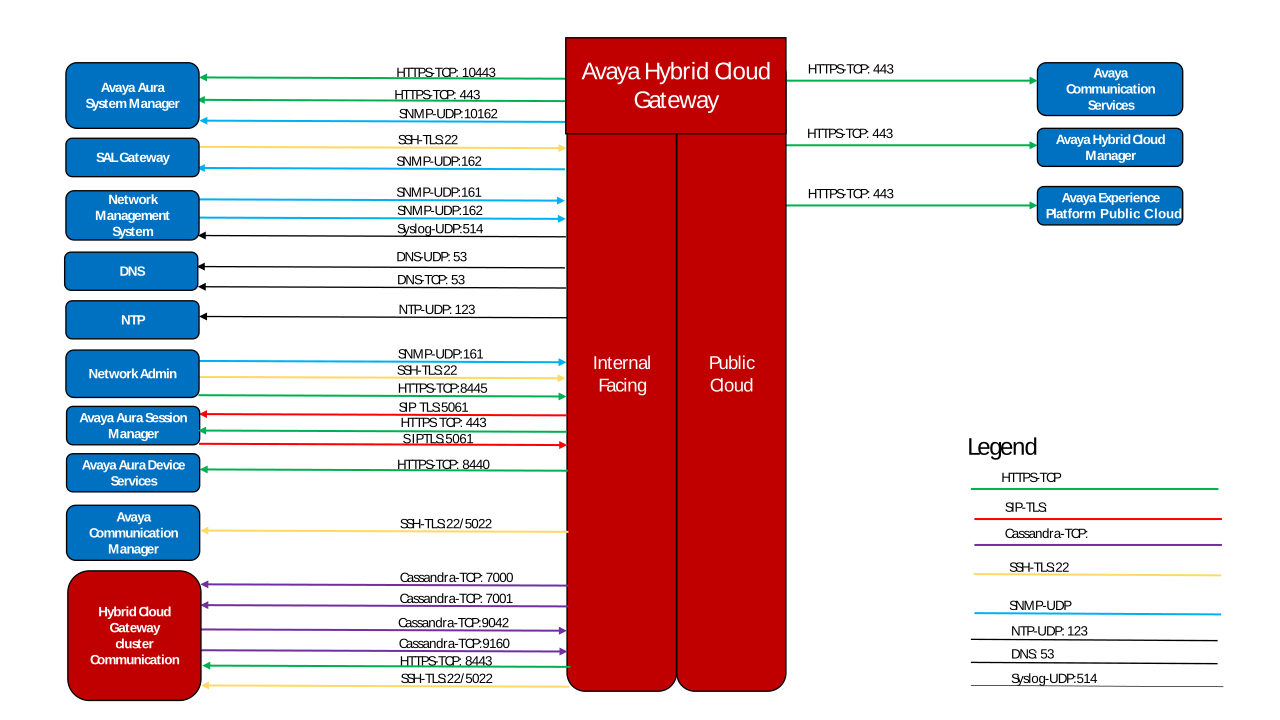
Port Matrix image for Avaya Hybrid Cloud Gateway

Send Feedback

Topic navigation

Previous Topic

Network firewall configuration

Next Topic

Firewall port matrix for signaling and data synchronization

In this article

STAY CONNECTED

Twitter Youtube Linkedin
Footer Icon
  • Sitemap
  • Terms of use
  • Privacy
  • Cookie Policy
  • Trademarks
  • Accessibility
© 2026 Avaya LLC