

AVAYA DOCUMENTATION CENTER
Find answers to your technical questions and learn how to use our products
Administering Avaya Aura® Call Center Elite
Example of a multisite call center network
The following example scenario shows how to design an Avaya Site Administration Time Synchronization schedule for a multisite call network that spans several time zones. The example sites and the respective time zones are shown in the following figure:
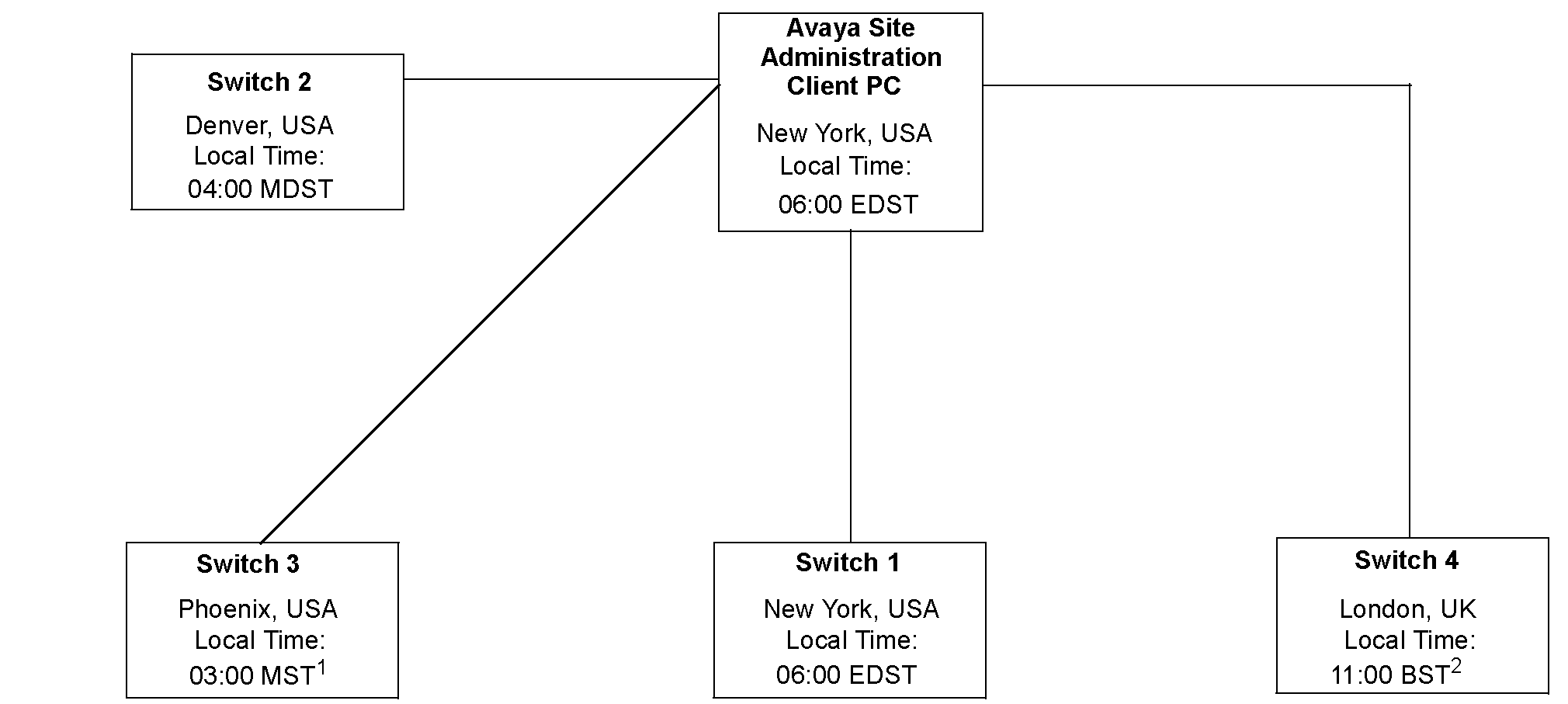
Site is not on Daylight Saving Time (DST)
British Summer Time (BST) is UK Daylight Saving Time (GMT + 1)
The call center network example in this figure includes four Communication Manager locations that are located in different time zones. In this example, all Communication Manager and the client are on Daylight Saving Time, with the exception of Communication Manager 2 located in Phoenix.
Using Avaya Site Administration to create a TOD synchronization schedule requires careful planning and consideration. The steps described in the following page represent the most error-free method you can use to design your synchronization schedule.