

AVAYA DOCUMENTATION CENTER
Find answers to your technical questions and learn how to use our products
Administering Avaya IP Office with Web Manager
Call Appearance Example 2
In this example, the user will use their call appearances to make two calls and start a conference between those calls.
|
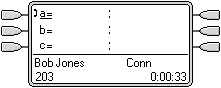
Initial Call
The user has a call in progress, shown on their first call appearance button. It is decided to conference another user into the call.
|
|
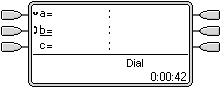
Make Conference Enquiry
Pressing the CONFERENCE button on the users phone automatically places the current call on hold and takes the phone off hook on the next available call appearance.
|
|
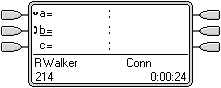
Enquiry in Progress
The other extension has been dialed and invited to join a conference call. The user presses the  CONFERENCE button on their phone again. CONFERENCE button on their phone again.
|
|
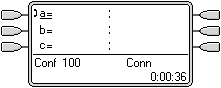
Conference Starts
The conference call has started. The separate call appearances have collapsed to a single appearance that represents the conference.
|