

AVAYA DOCUMENTATION CENTER
Find answers to your technical questions and learn how to use our products
Administering Avaya IP Office with Web Manager
Overriding a Time Profile
You can use the setting to manually override a time profile. The override settings allow you to mix timed and manual settings.
The override options are as follows:
-
Set Time Profile Active Until Next Timed InactiveUse for time profiles with multiple intervals. Make the time profile active until the next inactive interval.
-
Set Time Profile Inactive Until Next Timed ActiveUse for time profiles with multiple intervals. Make the time profile inactive until the next active interval.
-
Set Time Profile Latch ActiveSet the time profile to active. Timed inactive periods are overridden and remain active.
-
Set Time Profile Latch InactiveSet the time profile to inactive. Timed active periods are overridden and remain active.
The illustration below provides an example of each override setting.
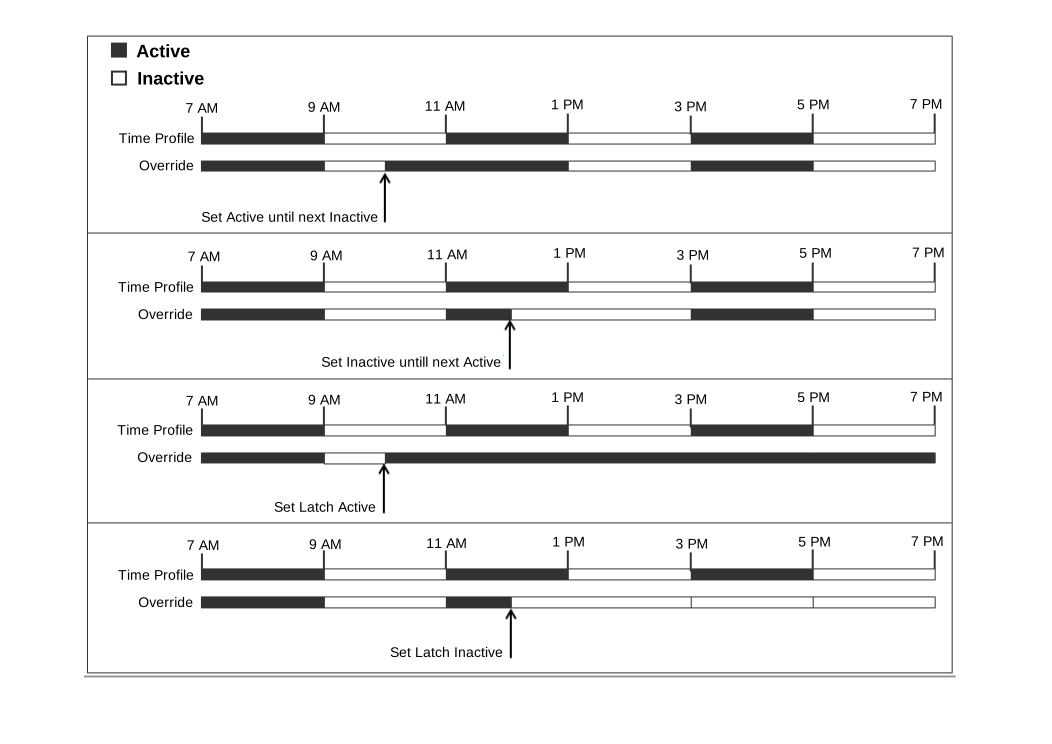
A time profile can be overridden using the following methods.
-
Using the Override settings on the Time Profile configuration page.
-
Configure short codes for the time profile. See the description for the “Set Time Profile” short code.
-
Configure the Time Profile button action for the time profile. See the description for the “Time Profile” button action.