AVAYA DOCUMENTATION CENTER
Find answers to your technical questions and learn how to use our products
Administering Avaya IP Office with Web Manager
User Dialing
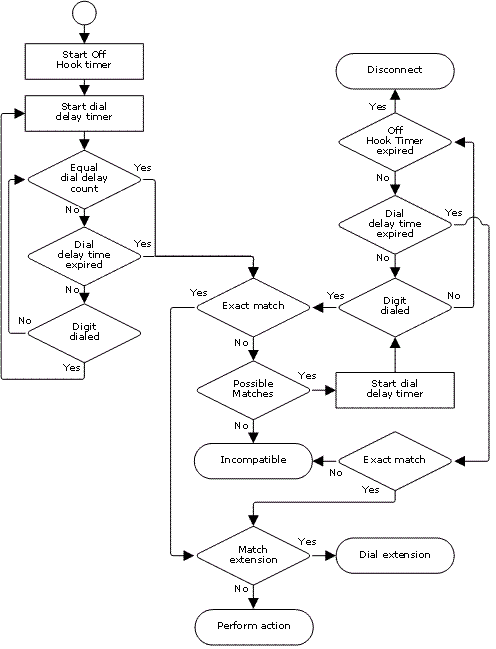
The following rules are used when short code matching is performed for user dialing:
-
A short code is used immediately an exact match is found unless followed by a ; semi-colon.
-
If a ; semi-colon is present, dialing complete can be indicated by the user pressing # or the Dial Delay Time (see below) expiring.
-
-
If no match is found but partial matches exist, the user can continue dialing.
-
If no match or partial matches are found, incompatible is returned.
-
The following precedence is used to determine which short codes are used:
-
Extension number matches override all short codes.
-
User short codes override user rights and system short codes.
-
User Rights short code matches override system short codes.
-
-
When multiple exact matches exist:
-
The match with the most specified digits rather than wildcards is used.
-
If there are still more than one match, the match with the most exact length is used. This means X single-digit wildcards will override N multiple0digit wildcards when both match.
-
-
The rules above are applied even if the number is dialed by selection from a directory or using any other method of stored number dialing.
User Digit Dialing Settings
The following system settings influence user dialing.
-
Dial Delay Count: Default = 0 (US/Japan), 4 (ROW).This value sets the number of digits dialed before the system starts looking for short code matches.
-
Dial Delay Time: Default = 4 seconds (US/Japan), 1 second (ROW).This value sets the maximum allowed interval between the dialing of each digit. If exceeded, the system treats dialing as completed and looks for a short code match even if the Dial Delay Count has not been reached.
-
Off-Hook Timer:When a user goes off-hook, the system starts a 30 second off-hook timer (10 seconds in Italy). If the off-hook timer expires before a short code match occurs, the user is disconnected.
User Dialing Flowchart