

AVAYA DOCUMENTATION CENTER
Find answers to your technical questions and learn how to use our products
Administering Avaya IP Office with Web Manager
Windows Certificate Store
The certificate store used by Manager to save and retrieve X509 certificates is the default one provided by the Windows operating system. The Windows certificate store is relevant to any application running on Windows that uses certificates for security, either TLS or HTTPS.
Other:
-
Avaya accepts no responsibility for changes made by users to the Windows operating system. Users are responsible for ensuring that they have read all relevant documentation and are sufficiently trained for the task being performed.
Windows Certificate Store Organization
By default, certificates are stored in the following structure:
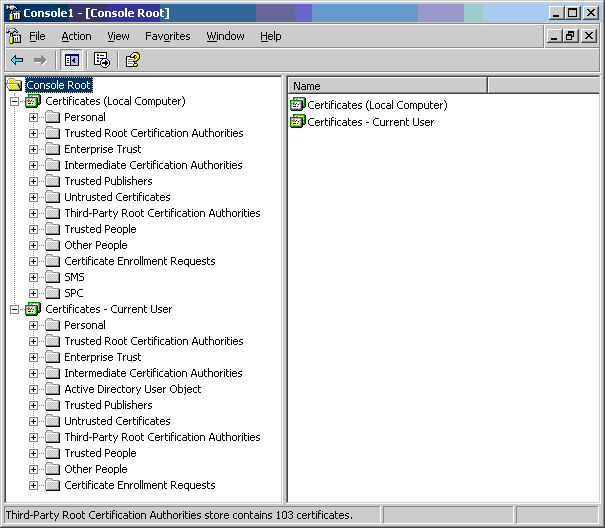
Each of the sub folders has differing usage. The Certificates - Current User area changes with the currently logged-in Windows user. The Certificate (Local Computer) area does not change with the currently logged-in Windows user.
Manager only accesses some of the certificate sub folder:
|
Certificates (Local Computer) Folder
|
Manager Use
|
|---|---|
|
Personal | Certificates
|
Folder searched by Manager 1st for matching certificate to send to the system when requested. Certificate matched by the subject name contained in File | Preferences | Security | Certificate offered to the system.
Folder accessed whenever ‘Local Machine certificate store’ used for Security Settings.
Folder searched by Manager for matching certificate when certificate received from the system, and File | Preferences | Security | Manager Certificate Checks = Medium or High.
|
|
Trusted Root Certification Authorities | Certificates
|
Folder searched by Manager for matching parent certificates when non-self signed certificate received from the system, and File | Preferences | Security | Manager Certificate Checks = Medium or High.
|
|
Certificates – Current User Folder
|
Manager Use
|
|---|---|
|
Personal | Certificates
|
Folder searched by Manager 2nd for matching certificate (subject name) to send to the system when requested. Certificate matched by the subject name contained in File | Preferences | Security | Certificate offered to the system.
Folder accessed whenever ‘Current User certificate store’ used for Security Settings.
Folder searched by Manager for matching certificate when certificate received from IP Office, and File | Preferences | Security | Manager Certificate Checks = Medium or High.
|
|
Trusted Root Certification Authorities | Certificates
|
Folder searched by Manager for matching parent certificates when non-self signed certificate received from the system, and File | Preferences | Security | Manager Certificate Checks = Medium or High.
|
|
Other People | Certificates
|
Folder searched by Manager for matching parent certificates when non-self signed certificate received from the system, and File | Preferences | Security | Manager Certificate Checks = Medium or High.
|
Windows Certificate Store Import
In order to use certificates – either for security settings or Manager operation – they must be present in the Windows certificate store. Certificates may be placed in the store by the Certificate Import Wizard. The Certificate Import Wizard can be used whenever a certificate is viewed. In order for Manager to subsequently access this certificate the Place all certificate in the following store option must be selected:
-
If the certificate is to subsequently identify the system, the Other People folder should be used.
-
If the certificate is to subsequently identify the Manager, the Personal folder should be used, and the associated private key saved as well.
Certificate Store Export
Any certificate required outside of the Manager PC must be first saved in the Certificate store, then exported.
If the certificate is to be used for identity checking (that is, to check the far entity of a link) the certificate alone is sufficient, and should be saved in PEM or DER format.
If the certificate is to be used for identification that is, to identify the near end of a link) the certificate and private key is required, and should be saved in PKCS#12 format, along with a password to access the resultant .pfx file.