

AVAYA DOCUMENTATION CENTER
Find answers to your technical questions and learn how to use our products
Administering Avaya Aura® Session Manager
Rainy Day scenario
In this scenario, the primary System Manager has failed or has lost connectivity to the elements in the system. The system administrator manually administers the secondary System Manager as the active mode. The secondary System Manager manages all elements in the system.
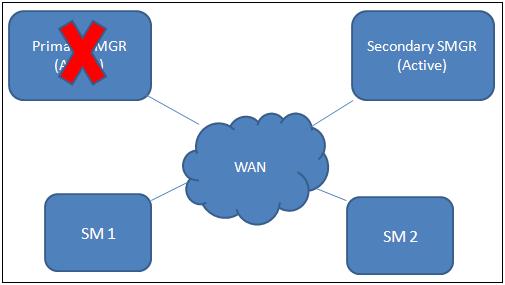
Reasons for the primary System Manager becoming inactive include:
The primary System Manager or the primary data center fails. You can recover the data by rebooting the System Manager server or the data center.
The primary System Manager fails and needs hardware replacement.
Shutting down the primary System Manager for maintenance purposes.
In the Rainy Day scenario:
The system sends an alarm to the system administrator.
The system administrator evaluates the situation, verifies that the failure is real, and administers the secondary System Manager to the active mode.
The secondary System Manager sends notifications to the elements in the network to indicate that the secondary System Manager is in the active mode.
The elements in the network verify that the secondary System Manager is in the active mode.
The Session Manager elements automatically connect to the secondary System Manager. For the Session Manager elements that are earlier than release 6.3, you must manually reconfigure these elements with the secondary System Manager.
The secondary System Manager replicates the data to the elements. The network operates with the secondary System Manager as the managing System Manager.
The system remains in this state until the administrator restores the system to the Sunny Day configuration.