

AVAYA DOCUMENTATION CENTER
Find answers to your technical questions and learn how to use our products
Administering Avaya Aura® Session Manager
Remote Access
Enterprises or Hosted Communication Solution Providers can use the Session Manager Remote Access feature to provide fully functional Avaya communication services to a remote user over the public Internet without VPN connectivity.
Reference configuration
A remote endpoint can use a Session Border Controller to access a Session Manager deployed in the enterprise network. Remote users can connect over the Internet to the public interface of Session Border Controller, which is at the edge of the enterprise network.
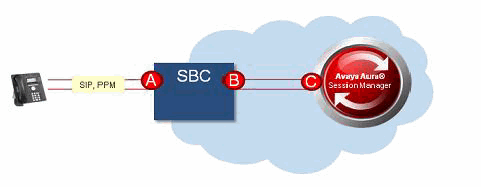
Reference point A indicates the external public-facing IP address and FQDN on Session Border Controller. It can also be either an external public-facing IP address or FQDN on Session Border Controller.
Reference point B indicates the internal facing IP address and port on Session Border Controller.
Reference point C indicates the IP address of Session Manager.
For the list of supported endpoints, see Avaya Aura® Session Manager Overview and Specification.
If the Enable IPv6 field is enabled on the Global Settings page, the IP Address Family field supports IPv6 addresses for remote access.