AVAYA DOCUMENTATION CENTER
Find answers to your technical questions and learn how to use our products
Deploying Avaya Aura® Device Services
Calculating space for the clone
About this task
Use this procedure to figure out if you have the necessary space for the clone. This example refers to System Manager but the same information applies to all Avaya Aura® components.
You can use the Cockpit user interface to calculate this information. You can also use the Command Line Interface (CLI). The units of measure may differ. The Cockpit user interface (UI) uses International Electrotechnical Commission (IEC) values, such as Gibibyte. The CLI uses International System of Units (SI) values, such as Gigabyte.
Procedure
- For administration actions, on the top-right of the window, click on the Limited access button.
Figure : 1. Limited access button

Note:You require administrator access in order to view virtual machines. Administrator access is like root access. Ensure that you take care making updates.
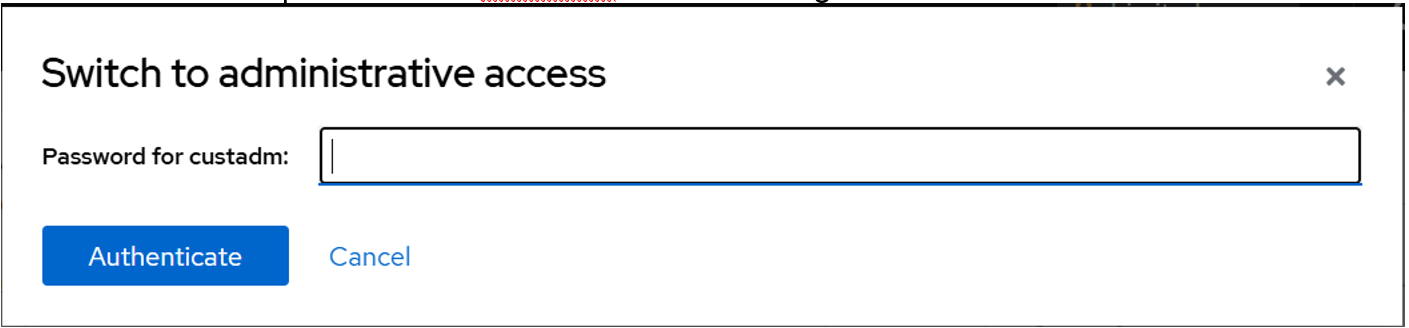
- In the Switch to administrative access window, enter the password for custadm.
Figure : 2. Switch to administrative access
The Limited access button on the top-right of the window changes to Administrative access.
Figure : 3. Administrative access button
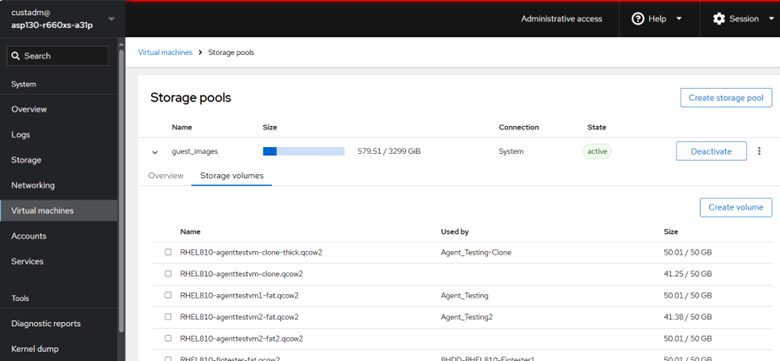
- Divide the amount of used and available space to get the percentage.
In this example, approximately 18% of the available storage is used (579.51/3299 ~ 18%).
Figure : 4. Example size