

AVAYA DOCUMENTATION CENTER
Find answers to your technical questions and learn how to use our products
Administering the Avaya Aura® Web Gateway
Linux alias commands
Linux aliases are defined to make frequently used commands easier to use. When an alias is available for the required operation, you can use the alias instead of typing a long path name and using sudo. The path name specification and sudo invocation are built into the aliases that Avaya provides.
Alias |
Description |
|---|---|
|
Change to frequently used directories. |
|
Perform application functions, such as install or backup. |
|
Manage the state of application related services. |
Some of the alias commands are only available after the application has been installed.
You can type any of the aliases in a Linux shell to list the supported commands.
The following image provides an example of how the aliases are used:
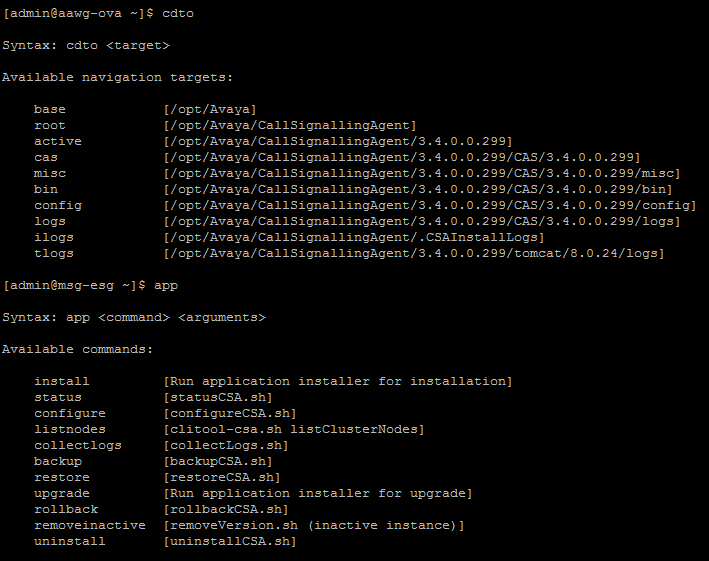
Each alias category displays the target command, which is in square brackets. The syntax for the command is provided in the procedures outlined in this document. Arguments that you specify after an alias are passed through to the target command.
The system can simultaneously have both an active and inactive installation of the software. For example, after an upgrade, the earlier version becomes inactive, but the new version becomes active. The alias commands operate only on the active installation unless specified.
Alias example |
Function provided |
|---|---|
|
Changes to the log directory of the active installation on the system. |
|
Runs the staged application installer. |
|
Restarts the telportal service. |
Note:
The aliases must be used only from the command line in a Linux shell. Do not use them in a script. You must use the actual target command in a script.