

A user gets HTTP error 500 when performing an activate call request

Last Updated : Jun 10, 2026 |

Condition

A user can log in to their client, but cannot perform calls. The client HTTP logs contain an HTTP error 500 incomplete telephone configuration for user entry. The Avaya Aura® Web Gateway nginx access log contains an HTTP error 500 entry for that user.

Cause

The issue might be caused by incorrectly configured Avaya Aura® Device Services dynamic configuration settings on Avaya Aura® Device Services.

Solution

Procedure

  1. In your browser, type the following URL:

    https://<AADS_FQDN>/acs/resources/configurations/user?username=<USERNAME>

    In this URL, <AADS_FQDN> is the Avaya Aura® Device Services FQDN and <USERNAME> is the name of the user that gets HTTP error 500.

  2. Enter the Avaya Aura® Device Services credentials.

    Avaya Aura® Device Services displays settings configured for the user.

  3. Ensure that the SET SIP_CONTROLLER_LIST parameter contains one or more System Manager IP address and SIP ports.
  4. If the SET SIP_CONTROLLER_LIST parameter does not exist or empty, ensure that:
    1. The SET SIPPROXYSRVR parameter exists and contains the System Manager IP address.
    2. The SET SIPSECURE parameter exists and is set to either 0 or 1.
    3. The SET SIPPORT parameter exists and contains the System Manager port.
  5. Ensure that the SET SIPUSERNAME parameter contains the correct user name.
  6. Ensure that the SET SIPDOMAIN parameter contains the correct user domain.
  7. If at least one of the parameters listed in steps 3 to 6 does not exist or has an incorrect value, do the following:
    1. Log in to the Avaya Aura® Device Services web administration portal.
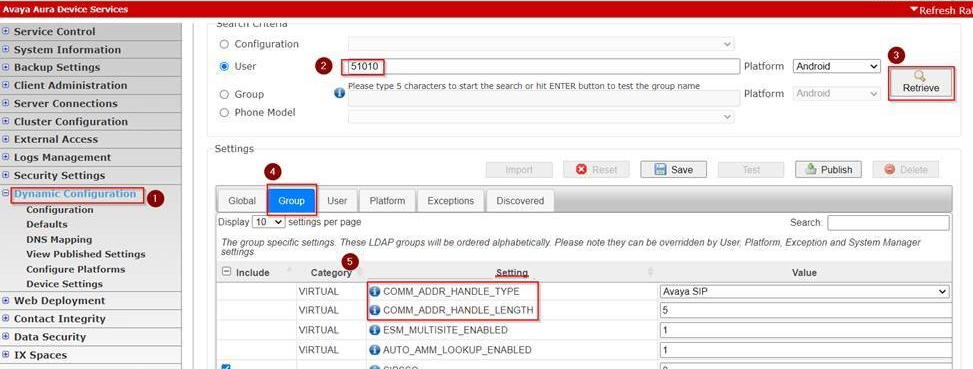
    2. Navigate to Dynamic Configuration > Configuration.
    3. In the Search Criteria area, select User and type the user name.
    4. In Platform, select the appropriate platform.
    5. Click Retrieve.
    6. In Settings, select Group.
    7. Ensure that the following parameters are configured:
      • COMM_ADDR_HANDLE_TYPE

      • COMM_ADDR_HANDLE_LENGTH

      The following is an example of the configured COMM_ADDR_HANDLE_TYPE and COMM_ADDR_HANDLE_LENGTH parameters:
  8. If these settings are not configured, configure the settings as appropriate and publish them for the user group that the user belongs to.

    For more information about editing and publishing dynamic configuration parameters on Avaya Aura® Device Services, see the Administration of the Dynamic Configuration service chapter in Administering Avaya Aura® Device Services.