AVAYA DOCUMENTATION CENTER
Find answers to your technical questions and learn how to use our products
Avaya Aura® Communication Manager Alarms, Events, and Logs Reference
How systems go into no-license mode
No License mode for Communication Manager Prior to R10.2.1.1
The No-LIC MO works with the LIC-ERR MO to find any errors or violations associated with the license file. Once a license file error occurs, LIC-ERR logs the error, raises an alarm, and generates the following SAT login message:
System administration will be blocked in approximately XXX hours. Contact your service representative.
Entry into license-error mode starts a timer that, when expired, causes the system to enter no-License mode. See Figure : 1. When Communication Manager enters the no-License mode, the following SAT warning message displays:
System administration is blocked. Contact your service representative immediately.
The system also responds with these conditions:
License error displays on all stations and consoles when they go off-hook, but disappears when the first digit is pressed. This display message does not interfere with the normal use of any station or console.
All terminal-login sessions are terminated.
Any subsequent terminal-login sessions are limited to:
Maintenance commands.
License file installation command.
Figure : 1. License mode algorithm 
The License file feature is loaded onto a switch during initialization of the switch software, restore of translations, and periodically thereafter. After initialization, a query is made to a software module called the license server. This module reads the license file, compares a serial number in the license file to a serial number in hardware, and compares the software version in the license with the running software version. If a match occurs, the license server delivers a new feature mask, an information set that controls which features are enabled or not on the Customer Options and Special Applications screens.
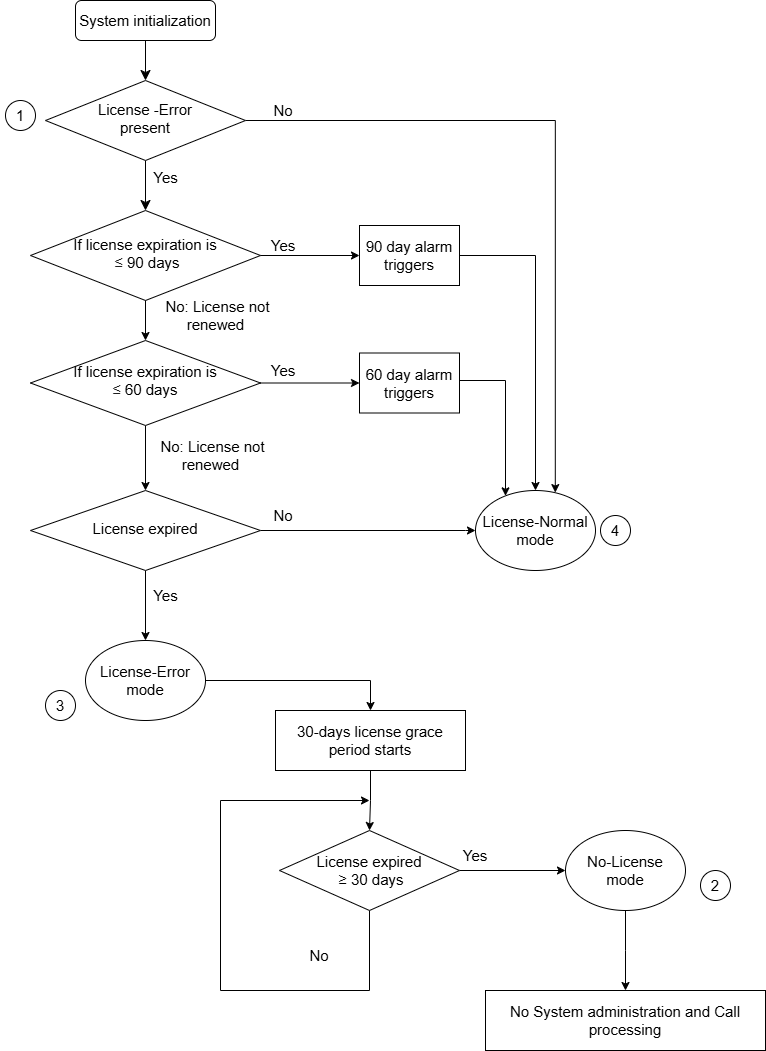
No License mode for Communication Manager from R10.2.1.1
The No-LIC MO works with the LIC-ERR MO to find any errors or violations associated with the license file. Once a license file error occurs, LIC-ERR logs the error, raises an alarm, and generates the following SAT login message:
System Administration and Call Processing Will Be Blocked in Approximately 30 days.Contact Your Service Representative Immediately.
Entry into license-error mode starts a timer that, when expired, causes the system to enter no-License mode. See the Figure : 2. When Communication Manager enters the no-License mode, the following SAT warning message displays:
System Administration and Call Processing Is Blocked.Contact Your Service Representative Immediately.
Beginning with R10.2.1.1, if the Communication Manager is in No-license mode, the system blocks call processing, including emergency calls, and system administration activities.