

AVAYA DOCUMENTATION CENTER
Find answers to your technical questions and learn how to use our products
Avaya Aura Presence Services Snap-in Reference
Access control policy
Presence Services uses the Avaya Breeze® platform service attribute to set the global, cluster, or user access control policy.
System Manager ACL configuration at , used for releases of Presence Services deployments before release 7.0, is not applicable.
ACL does not support federated domains that have more than six characters in their top-level domain. For example, a Skype for Business (S4B) user with the address user1@example.systems is not supported as the top-level domain
systemshas more than six characters.
Access control determines whether a watcher can view a user's presence. There are three policy levels: ALLOW, BLOCK, and CONFIRM.
-
ALLOW makes a user's presence public for all watchers.
-
BLOCK makes a user's presence private for all watchers.
-
CONFIRM gives the user the choice to allow or block presence for a particular watcher through an authorization request presented to the user by the presence client.For example, the Avaya one-X® Communicator displays an authorization dialog box as shown in the figure below:
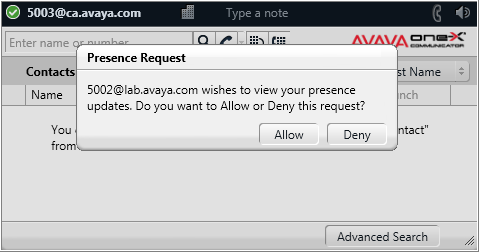
When changing an access control policy from ALLOW or BLOCK to CONFIRM, the presentity clients do not display access control authorization requests until after the presentity logs out and then logs back in again. When changing the policy from CONFIRM to ALLOW or BLOCK, previous access control authorizations continue to apply. To remove all previous access control decisions, use the access control script tool.
Note:
The default access control policy must not be set to CONFIRM if non-ACL-capable endpoints are deployed.
The access control policy is effective immediately. The new watcher requests receive an authorization request on the presentity’s Avaya one-X® Communicator client. The existing watchers do not receive any new presence updates until the presentity logs out and logs in again. After the presentity logs in again, they get an authorization request for anyone who was watching the presentity before, or has just requested to watch them. Immediate authorization requests are avoided on all existing presentities who are watched, as it impacts the network. For example, if there are 125,000 presence users with 25 contacts each, there would be more than 3 million authorization requests. Batching of requests is required, adding complexity and potential new problems.