

AVAYA DOCUMENTATION CENTER
Find answers to your technical questions and learn how to use our products
Avaya Aura Presence Services Snap-in Reference
Sending SMS to mobile users as private contacts
- Add external mobile users as private contacts of a Avaya OneCloud CPaaS-enabled Aura user to facilitate sending SMS to them through an IM.
- This can be done using an Avaya One-X Communicator client as shown in the following figure. The IM address is configured as <mobile number>@zang.io. You must suffix the mobile number with zang.io domain.
ADDITIONAL INFORMATION:
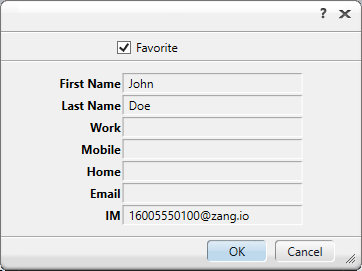
- This can be done using an Avaya One-X Communicator client as shown in the following figure. The IM address is configured as <mobile number>@zang.io. You must suffix the mobile number with zang.io domain.
- Once the private contact is added, the user can initiate an IM to this contact which will be delivered as a SMS to the mobile user.
- Ensure that the Spaces federation is enabled and configured.
- Ensure that the user has a Avaya OneCloud CPaaS phone number assigned in his communication profile.
ADDITIONAL INFORMATION:The mobile user who receives this SMS will see the Avaya OneCloud CPaaS phone number of the sender.If the mobile user sends an SMS or replies to an SMS, the SMS is delivered to the Aura user as an IM.