

AVAYA DOCUMENTATION CENTER
Find answers to your technical questions and learn how to use our products
Avaya Aura Presence Services Snap-in Reference
Modifying OpenNMS event definitions
The MIB compiler does not translate alarm severity or alarm parameters into the proper format for OpenNMS. You must edit each event to make it more usable and presentable in OpenNMS.
- On the OpenNMS web console, navigate to .
- In Event Management, click Customize Event Configurations.
- In the Select Events Configuration File menu, select the AVAYA-PRODUCTS-PRESENCESERVICES-MIB.events.xml events configuration file.
- Delete the avCESERVICE1 trap event as the OID conflicts with the avCESERVICE29 event.
- Perform the following steps to customize all the events:
- Select the trap event and click Edit.
ADDITIONAL INFORMATION:For example, avCESERVICE20.
- Modify the Severity field from Indeterminate to a more appropriate level.
- Modify any parameters in the Description text from either {1} or $1 to the OpenNMS format of %parm[#1]%.
- Repeat for each parameter in this event.
ADDITIONAL INFORMATION: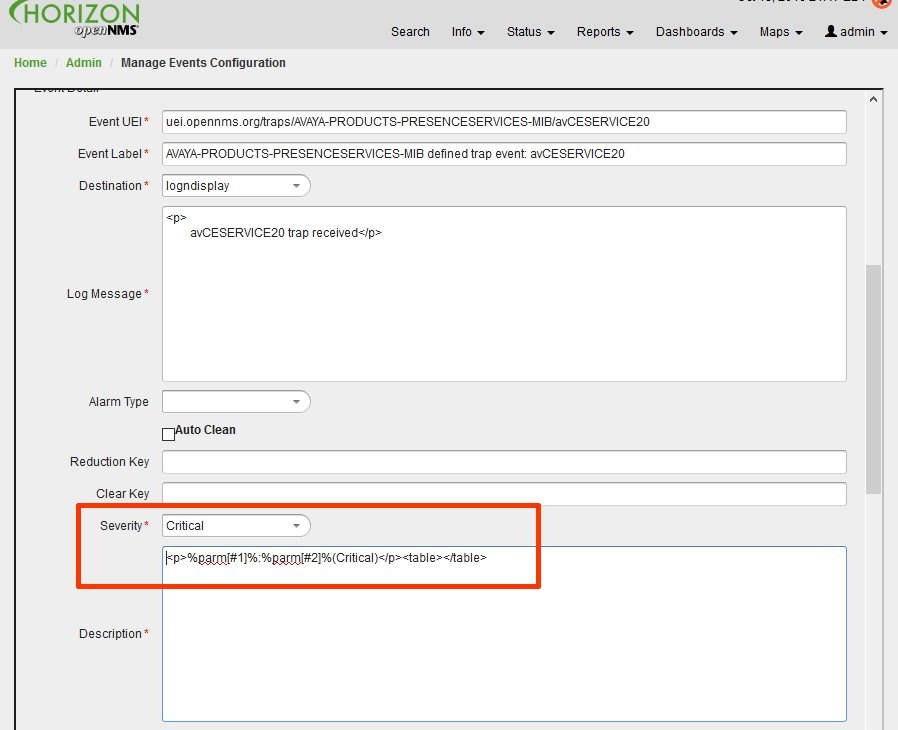
- Select the trap event and click Edit.
- Click Save and repeat for each trap event in the file.
- After all the trap events have been updated, click Save Events File.
- Click Yes to overwrite the existing file.