

AVAYA DOCUMENTATION CENTER
Find answers to your technical questions and learn how to use our products
Avaya Aura Presence Services Snap-in Reference
Importing MIB files into OpenNMS
The exported MIB files must be imported into OpenNMS to interpret incoming SNMP alarms and convert them into OpenNMS events. Use the following steps to import the required MIB files.
- On the OpenNMS web console, navigate to .
- In Additional Tools, click SNMP MIB Compiler.
- Click Upload MIB, and select the avaya-products-PresenceServices.my MIB file for uploading.
ADDITIONAL INFORMATION:The system loads the MIB file into the pending area.
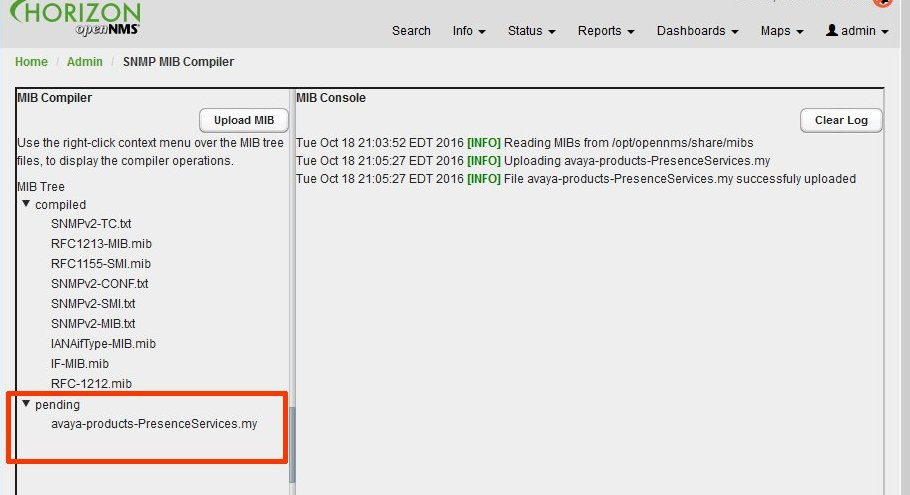
- Right-click the avaya-products-PresenceServices.my file in the pending list and select Compile MIB.
STEP RESULT:The MIB file will now appear in the MIB compiled tree.
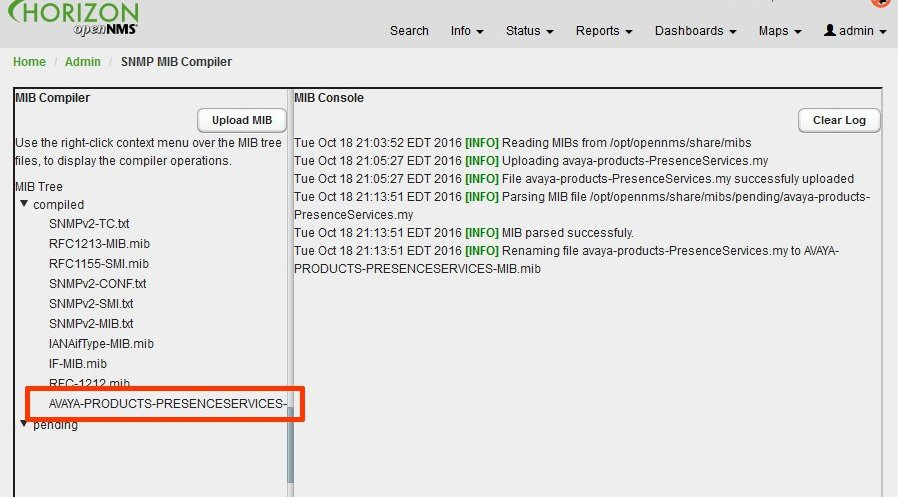
- Right-click the avaya-products-PresenceServices.my file in the compiled list and select Generate Events.
- Click Save Events File.
ADDITIONAL INFORMATION:The system creates an OpenNMS event definition file for all Presence Services alarms defined in the MIB file.